Sorting by

×
Home Blog Page 2

5 Tools to Remove Twitter Followers

0

5 Tools to Remove Twitter Followers

You must’ve thought of making a spring-clean on Twitter when you see you don’t vibe with some of your followers anymore. After all, we go through incredible changes along the way. And we may not be the same person who happened to let that follower in once. However, even though making a fresh start on Twitter sounds incredibly relieving and fresh, it’s easier said than done if you’re thinking of “mass removing” your followers. So, let’s say you want to remove your 100 followers (no need to mention even higher numbers). Twitter does not allow you to get rid of them all at once. You’re supposed to pick up them all one by one and remove them from your followers manually.

This sure sounds tedious!

However, a spectacular assistant to handle this demanding job is Twitter Management Tools. The tools help remove many followers on Twitter in a matter of seconds.

Throughout this article, I’ll share with you the 5 Best Tools to Remove Your Twitter Followers and help you pick up the best among the tools on the market.

#1 Circleboom

Circleboom Twitter is the best’ all-in-one’ tool that helps clean or remove all your followers in one click!

If you need to force unfollow some or all your followers, you can use the “remove follower” feature on Circleboom. Circleboom allows you to filter your followers by various features, like their verification status and activeness levels on Twitter.

The filter options help “mass remove” your followers quickly based on your followers’ common characteristics. You can find inactive, overactive, egghead, fake, spammy, bot, etc., followers and remove them with Circleboom Twitter.

Plus, you can bulk-unfollow or remove all your followers by clicking on “Remove Selected Followers.”

Moreover, Circleboom Twitter is a super-comprehensive tool, and removing followers is the least it can do for you.

You can also get rid of your old tweets, retweets, likes, or Twitter archive, with the help of Circleboom Twitter. You can even delete your old replies mentioning accounts you don’t want in your life anymore.

Notwithstanding, the best thing about the Circleboom Twitter tool is its price plans. The tool provides high-quality service and a wide range of life & energy-saving features at prices lower than most other tools on the market.

Circleboom Twitter iOS app makes it possible to enjoy removing Twitter followers on your iOS devices!

#2 SocialOomph

SocialOomph is the second “follower remove tool” used for Twitter. It helps manage your Twitter account easily with its various features, like unfollow tool.

This way, you cannot spend long hours on simple but repetitive tasks like removing your followers manually by going to their individual profiles individually.

Apart from unfollow tool, SocialOomph also offers bulk scheduling posts and automated posting. So, the tool is pretty convenient for automating and optimize your Twitter experience.

A 30-day free trial is available for SocialOomph, but it requires credit card verification, which is likely to repel first-timer users.

#3 Crowdfire

The motto of the Crowdfire tool is ‘Social Media Management, Simplified.’

It is an easy-to-use management tool to unfollow accounts. Like Circleboom Twitter, Crowdfire also tells you who doesn’t follow you back and allows you to select them all for “mass removing” from your followers.

If any follower of yours ever started following and dropped back in the following days, you can imagine how useful this feature can be for you!

Nevertheless, beware that the prices per social account (to connect) for Crowdfire are slightly higher than Circleboom (but lower than SocialOomph). So, I recommend you compare each tool’s price plans by their ‘price charged per account number.’

#4 iUnfollow

iUnfollow is a popular Twitter tool with more than 300.000 users since 2011. It is an exciting tool that lets you unfollow whoever does not follow you back. The tool lists the users that do not follow you and allows you to unfollow them with a single click.

But, unlike the tools above, iUnfollow does not offer you a full-automated service. So, you can’t remove all your followers altogether. Instead, you click on each profile that you want to unfollow. So, the tool is practically semi-automated.

iUnfollow may not be quite suitable or effective for you if you have (let’s say) thousands of followers to remove or unfollow. Yet, it is still recommended for its popularity and affordable price plan.

#5 Tweepi

Tweepi is the last Twitter management tool in this article. It uses state-of-art AI algorithms to help you optimize your Twitter account.

Like other tools above, Tweepi helps clean up your followed accounts list, identifying your non-followers. What stands out for Tweepi is that it gives ‘AI-generated’ unfollow suggestions.

Lastly, although it provides high technology, AI-based services for its users, Tweepi is one of the most expensive tools on the market. And it’s the most pricey one in this article.

This is because its price plans cover only one Twitter account, discouraging newcomers from subscribing to the tool.

All in all

Who doesn’t need a fresh feel on Twitter that comes with a massive follower clean? It’s quite natural anyway to feel you don’t resonate anymore with some of your followers.

But, considering Twitter doesn’t let you bulk remove your followers, we see that this relief may cost us a lot of time and patience!

Here is the point these excellent fellows come into play and save you from the double trouble. Yes, these fellows are Twitter Management Tools. They help remove lots of followers on Twitter in a few seconds.

Since there are many tools on the market, I thought picking up the five tools and sharing them with you would greatly help.

Circleboom Twitter tool that deserves the #1 spot in this article proves its superiority with its features and affordable price plans. So, I strongly recommend you sign-up for its forever-free tier plan and decide later whether to upgrade your Circleboom experience along the way.

In Nigeria? Try These Virtual Dollar Card Platforms [Updated Daily]

2

So, Barter and co are down and I thought it would be great to curate virtual dollar card platforms (that still work) here. I will update it daily based on feedback from everyone. So, please leave comments if any of these works or doesn’t work for you.

NOTE: These platforms might require your BVN, NIN or any Govt. Issued ID during registration and that’s fine. No fear. Also, these are interesting times, if you manage to create an account and use these platforms, keep your login/passwords safe. Hol am tight, guy!

ALAT by Wema – I have used it to renew my Google One account before

Wallets Africa – I hear it still works…

Mintyn – Mintyn Virtual Dollar Is A Non-Physical Dollar-Denominated Card That Is Used For Online Transactions. Your Virtual Card Allows You To Easily Pay On Amazon, Apple Music, Netflix, And Many More.
Update: Mintyn has suspended its virtual dollar card service for now. Instead, they’re offering gift cards to make dollar payments.

Chipper Cash – They said their virtual cards are not working for International payments right now. But they work locally… Then, another friend said it works for them… Try am!

Geegpay – A digital platform for the gig economy. They also provide virtual cards. Update: A friend could not register yesterday… might be okay now

Golance – It’s a freelance platform like Upwork. If a client pays you there, you can create a virtual dollar card and use the card for anything online. I use their dollar card and it’s smooth.

Payoneer – You can also get a virtual Mastercard from Payoneer if you have been using them. If you haven’t then register

Fundall – Never used it but I hear you can use their cards to pay for Netflix and co.

Changera – A crypto platform. You can pay your bills, pay workers and exchange money with the platform.

Sudo.Africa – Create and fund cards that can be used anywhere on the internet.

Flip By Fluidcoins: Virtual cards are now out for Android users. Sign up, go through KYC and let Lanre know... They’d enable the feature for you.

I’ll update this page daily to keep us all updated. Don’t forget to share a platform you know if it’s not here. Thanks

How to Choose an NFT Project to Invest In

0

This post was compiled by: Aesthetic.a#4615

How to Choose an NFT Project to Invest In

We want you to be safe and choose wisely where to put your money so please, read carefully

DO I LIKE THE ART?

The first thing you see in an NFT project is the art, and despite the fact that NFTs are not just art, this is a huge part of the appeal of it.

Ask yourself these questions:

– Do I like the art? and why do I like it?
– Is the project unique or is another derivative/copy? ( DYOR! Use first google image search on multiple pieces, then check Twitter and socials, discord, etc)

It sounds basic maybe, but works most of the time: many people don’t use all of their brain in business, they think only about the business part of it, but what drives consumers to buy a product are emotions, the connection they make with the brand.

IS IT ORIGINAL?

Once you look at the NFT market, you will notice that there is no real structure in place to ensure that copyrights are not infringed or to set a standard that eliminates a copy-and-paste-anchored economy, other than the effor we can put in it as a team.
Since there are no industry standards, it is no surprise that project owners and teams try to capitalize on the success of major collections(for example Monkeys, Punks, Bears, etc)

– If you are investing for the sake of the art, go for it: you like it, you own it, you support the artists behind it.
– If you are trying to make a profit in the long term, think before investing in a derivative project and we cannot reiterate this enough, DO YOUR OWN RESEARCH!

SOCIAL MEDIAS

For obvious reasons, social media is a key tool for NFT projects, whether we like it or not.
It’s impossible to overestimate the value of social media interaction when it comes to building an engaged community around a platform or a product.

It’s not just about the number of followers in this case.
Instead, a greater emphasis should be placed on the quality of engagement generated by the project on social media networks.
This is generally a good indicator of a successful project.

ARE THE TEAM DOXXED/TRUSTWORTHY?

When it comes to teams, reputation and experience are key aspects to consider, especially in an industry where developers and artists sometimes choose anonymity.
It’s possible that you’ll have to evaluate whether projects led by an unknown team are worth taking a chance on.
Keep in mind when making this decision that projects that aren’t doxxed (i.e., haven’t made the team’s details public) are more difficult to evaluate objectively.
Because if the identity of the team members are kept hidden, you can’t make an appraisal based on the team’s experience and past successes/failures.

DOES THE PROJECT HAVE A ROADMAP/WHITEPAPER?

If the team refuses to produce a whitepaper or roadmap, it is impossible to comprehend the complexities and technologies involved in the creation or development of an NFT project.
If you’re going to invest your hard-earned money in a project, at the very least you should be able to assess the team’s seriousness and the roadmap’s long-term viability.

DO THE PIECES HAVE RARITY?

Traits and rarity criteria are critical components in making NFT successful on LaunchMyNFT and in general if we talk about generative collections.
If NFTs hadn’t established its rarity in the web3 space, they wouldn’t have gotten as much attention.
The appeal of NFT as a technique resides in the ability to verify that digital assets are one-of-a-kind or have distinct characteristics.
This is why, before purchasing NFTs, it is critical to check their rarity.

It’s important to remember that the goal is to buy uncommon NFTs at a low price rather than paying a high price that you won’t be able to recoup.

How to Make Money From Designlab

Designlab teaches UX and UI Design online. You don’t just learn on the platform, you’ll also have access to mentors who provide world-class 1-on-1 online training in UX design, access to a vibrant community, and help land that first product design job.

Anyone can enrol to study on Designlab, but that’s not exactly why I am sharing this. In this post, I will be explaining how to make money from Designlab.

How to Make Money From Designlab

Designlab has a referral program where you can earn as much as $300 when you refer someone to enrol for their UX training. If you refer anyone to take any other short course on Designlab, you also earn $40.

How can I start?

More Information from Design Lab Below

Step 1:
Join our program. Apply to Designlab’s Affiliate or Ambassador Program. Once your application is approved, you can start sharing your link.

Step 2:
Share your link in as many places as you can (social media, blog posts, newsletters) to maximize your rewards.

Step 3:
Earn Rewards. If you refer someone who enrols in their first Designlab course, you’ll get paid for every course they take.

What is the reward structure?
You will receive $40 for each short course enrollment (including UX Academy Foundations) that your referrals make, and $300 for each UX Academy enrollment (reward may vary depending on your partner type). Rewards will be made payable 4 weeks after the student places their course deposit unless the reservation is cancelled before then.

How do I get paid?
At the end of each month, your rewards are calculated and available for cash-out via PayPal or Stripe (alternative methods available for non-PayPal regions).

When do I get paid?
Payments are verified and paid-out in the month after your commission is earned. For example, any commissions earned in February will be available March 13th.

How long is my window on each referral?
Your referral window is 90 days from when they click your link. The window is extended another 90 days after each course enrollment that your referral makes. For instance, if a student enrolls in UX Academy Foundations within 90 days of clicking your link, then 30 days later enrolls in UX Academy, you will receive credit for both enrollments.

How do I learn about your different course offerings?
All our courses can be found on this page of our website:
https://designlab.com/courses/

Who can I contact for more information?
danielle@designlab.com

How to Buy Cheaper Dana Air Flight Tickets

0

Earlier in 2022, I shared a TikTok video about how to travel cheaper and I noticed a few people reshared it. You can watch the video here.

In this post, we will be looking at two ways to buy cheaper Dana Air flight tickets. Dana Air is a Nigerian airline headquartered in Ikeja and based out of Lagos’s Murtala Muhammed International Airport. They fly Abuja, Enugu, Lagos, Owerri and Port Harcourt on a current base fee of NGN50,000 for flight tickets.

How to Buy Cheaper Dana Air Flight Tickets

1. DanaMiles

Dana Miles is an industry-winning loyalty and rewards Program. With Dana Miles, members enjoy a truly rewarding experience with unique privileges across three membership tiers:Blue, Silver & Gold. Dana Miles members can expect to earn more miles, enjoy more benefits, quicker tier upgrades and easier tier renewal, redemption and more.

How do I become a Dana miles member?

You may apply for membership by completing fully and accurately the online enrolment form through https://www.flydanaair.com/dana-miles-register/or complete the enrolment form and return it to Dana Air for processing. Note: Membership is open only to individuals who are above 12 years of age at the time of joining. Membership is not open to companies, partnerships, unincorporated associations, or similar entities.

If you would like to learn more about Dana miles, click here

2. Coupons

Another way to get cheaper flight tickets is to look for coupons online. You can Google the name of the airline and the word “coupon” or “voucher” to find websites where these coupons posted. Most airlines have coupons that give you 25% discount or even more when you use the coupon code while booking a flight.

Lastly, you can subscribe to their newsletter for occasional discount updates.

How to Make Money From BitDegree

What is BitDegree?

BitDegree has been in the online Education space for a while. So, what is BitDegree? BitDegree is an online course-providing platform focused on teaching people digital computing skills such as web development, data mining, database manipulation, creating games, blockchain development and more. It’s like Udemy, but more focused on Blockchain, Crypto Trading, DeFi, NFT, GameFi, dApps, Blockchain Development and Digital Skills.

Is BitDegree free?

Some courses on the platform are free and the others are quite affordable.

How to Make Money from BitDegree

BitDegree has an affiliate program. This extremely beginner-friendly BitDegree affiliate program offers an unmissable opportunity to earn money quickly straight from the comfort of your home. The people you refer to BitDegree don’t have to buy a course for you to get rewarded. If they buy a course, you will earn 30% commission for every sale. If they don’t buy a course, you will earn 20 BDG tokens for every free active referral. Yes, BitDegree offers rewards for referrals that don’t buy anything, too!

How can I apply to become a BitDegree affiliate?

This is also simple. Click here to register on BitDegree.

Then visit this link to register as an affiliate.

That’s all you need to do, really.

Do I have to pay or get chosen to become a BitDegree affiliate?

No, you don’t need to pay any fees and there are no restrictions to becoming a BitDegree affiliate – anyone can do it. In that way, BitDegree provides users with one of the easiest ways to make money online and from home.

How does BitDegree Affiliate program pay?

At the moment, you can receive your earnings in traditional currencies (such as USD/EUR). The payments will be transferred into your PayPal account.

How To Receive Payments From Skrill Through Binance In Nigeria

0

Over time, I have realized that finding a low-fee, reliable, and fast platform to receive payments in Nigeria is a hurdle – one almost as challenging as getting a job.

I lost almost 30% of my first foreign pay on the payment platform that I tried back then. After the ridiculous charges, there was a frustrating conversion rate, and at the end of the day, I lost a substantial chunk of my pay.

I know how frustrating it is, so I will be sharing a better solution I found to receiving payments in Nigeria – Skrill (through Binance.)

Now, whether you are a freelancer, online merchant, tech bro, or woman in tech with customers or business associates abroad, rest assured that there is a payment platform that can support your transactions.

We will be looking at a step-by-step procedure (with screenshots) of how to receive payments from Skrill through Binance in Nigeria.

What is Skrill?

Let’s start with a brief explanation of Skrill. Launched in 2001 as Moneybookers and based in London, United Kingdom, Skrill is a European online payment platform currently available in 200 countries, including Nigeria.

It simplifies transactions for online vendors, gamers, forex traders, and freelancers.

This payment platform offers business and personal accounts, allowing you to transfer money, shop online, and buy cryptocurrency.

How do I open a Skrill account?

The Skrill signup process is one of the easiest. All you need is a valid email address.

But here is the catch. As soon as you receive payment on Skrill, your account will be blocked. You will then be prompted to verify the account before you regain access to that account and the funds there.

How do I verify my Skrill account?

The verification process is a bit thorough; after all, we are dealing with money here. Anywho, you will need first to download the app if you were accessing the platform on the web.

Then, you will be asked to provide card details, Visa or MasterCard, any utility bill (NEPA bill), or account statement from your bank as your proof of address, and a valid ID card (permanent voters card, driver’s license, or National ID card.)

Note: Skrill does not accept the NIMC slip or the e-ID. Also, scan and take clear pictures of your documents in well-lit rooms.

After submitting your details, it should take 2-7 days to get a response from Skrill. If your details were found acceptable, you would regain complete control of your account and funds.

 How do I log in or sign in on my Skrill account?

You can sign in on your account on the Skrill website or from the app on your mobile devices. The app is available on Android and iOS for iPhones and iPads.

How do I receive payment from Skrill to my bank account?

You can withdraw your Skrill funds via wire transfer (SWIFT). But depending on your bank, it may take 2 to 7 workdays, and the exchange rate will be that of the bank.

[irp posts=”12993″ name=”How to Receive Foreign Payments Seamlessly using Sendvalu”]

How do I receive payment from Skrill to my bank account through Binance?

This is a faster, low-fee option for you. You can receive payment from Skrill through Binance in 45mins or less. I will share my process in steps you can follow.

So, I had some Skrill dollar funds, and I wanted to withdraw to my GTB account. Let’s go through my journey together.

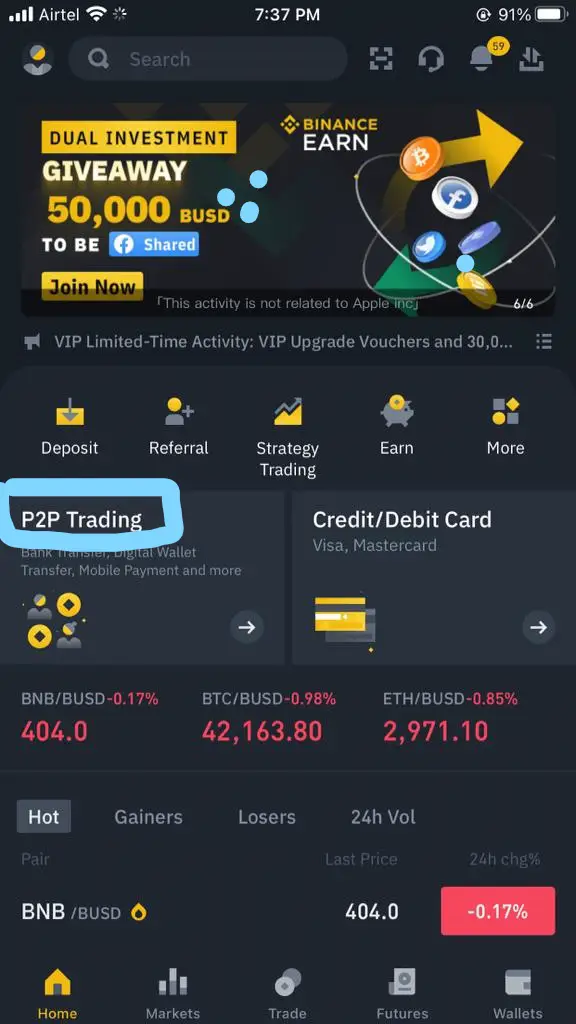
Step 1: Open your Binance app and log in.

Step 2: Click on P2P trading

Step-one-Skrill-to-Binance


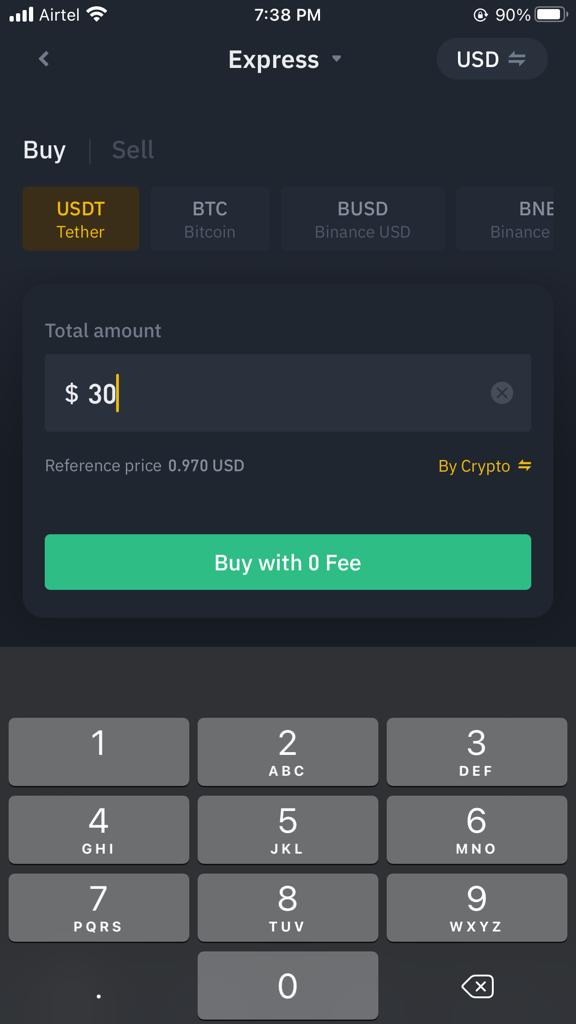
Step 3: Ensure the status is “Express” and the currency is the currency you want to buy (for me, it was USD). Then type the amount of Skrill funds you wish to sell. Mine was $30.

Step 4: Hit the “Buy with 0 Fee.”

receive-payment-from-skrill

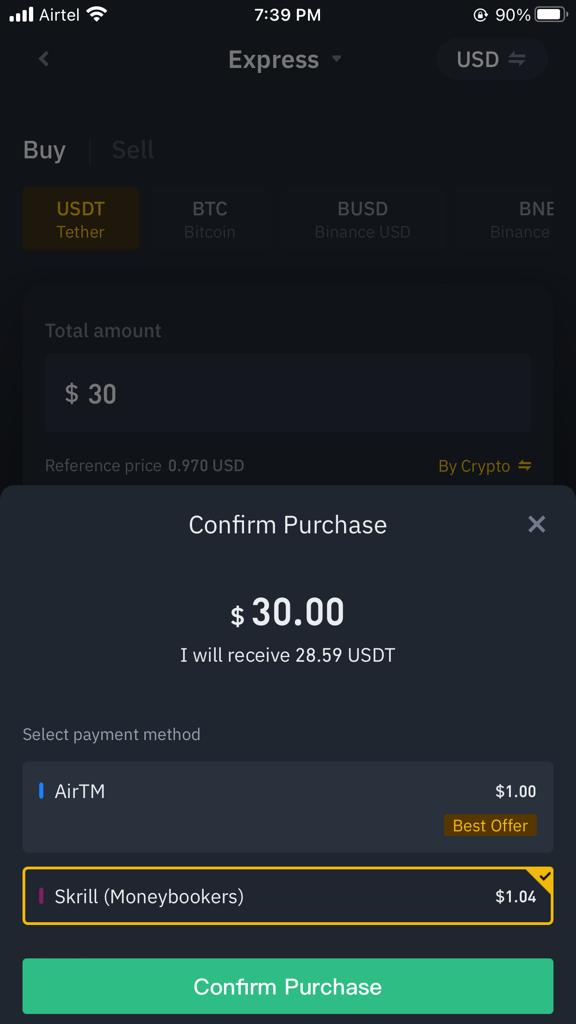
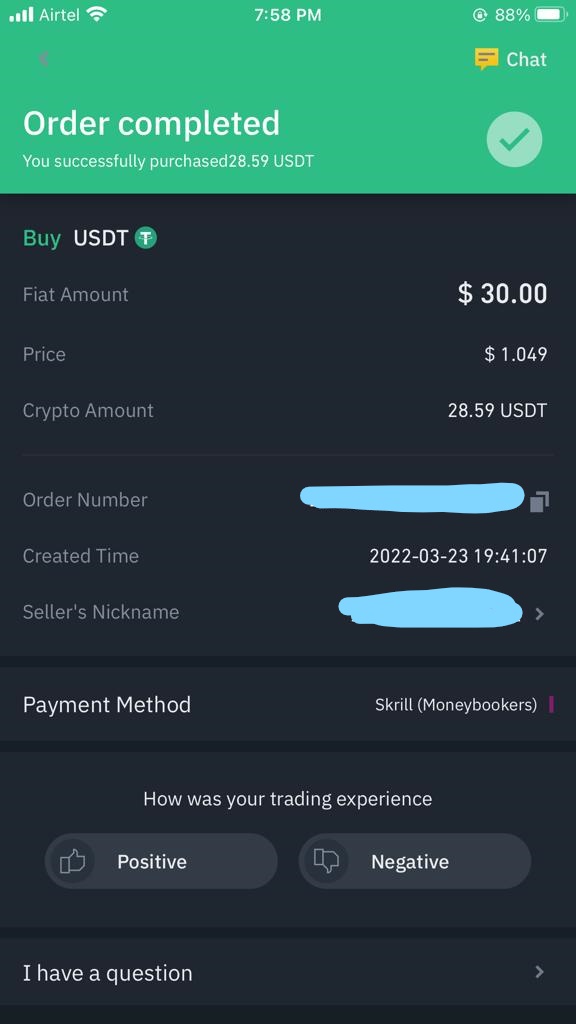
Step 5: Select “Skrill (Moneybookers)” and confirm the purchase. Notice that the charge was $1.41 for this transaction from Binance, and I will be receiving 28.59 USDT.

Skrill-to-Binace-Payment

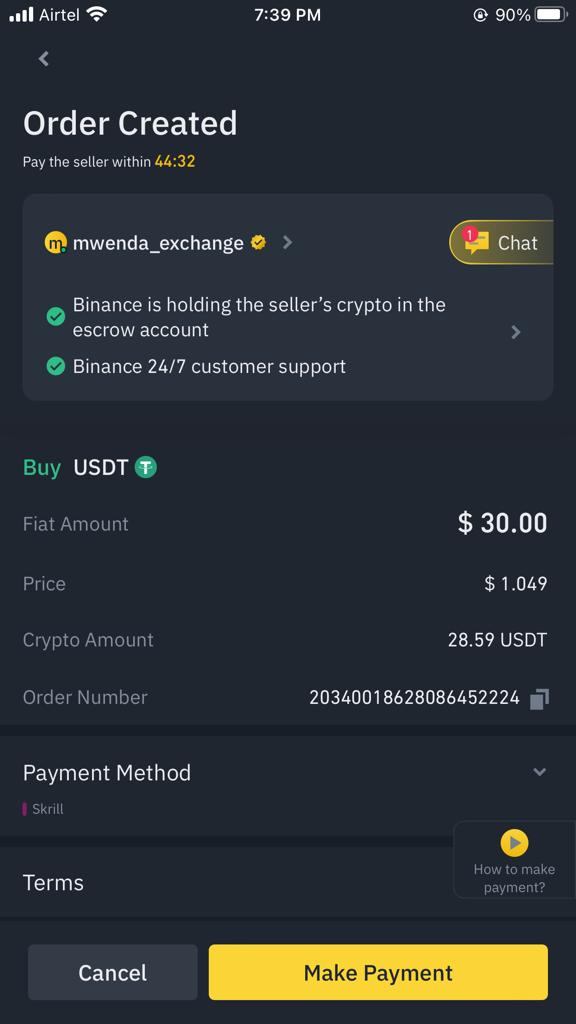
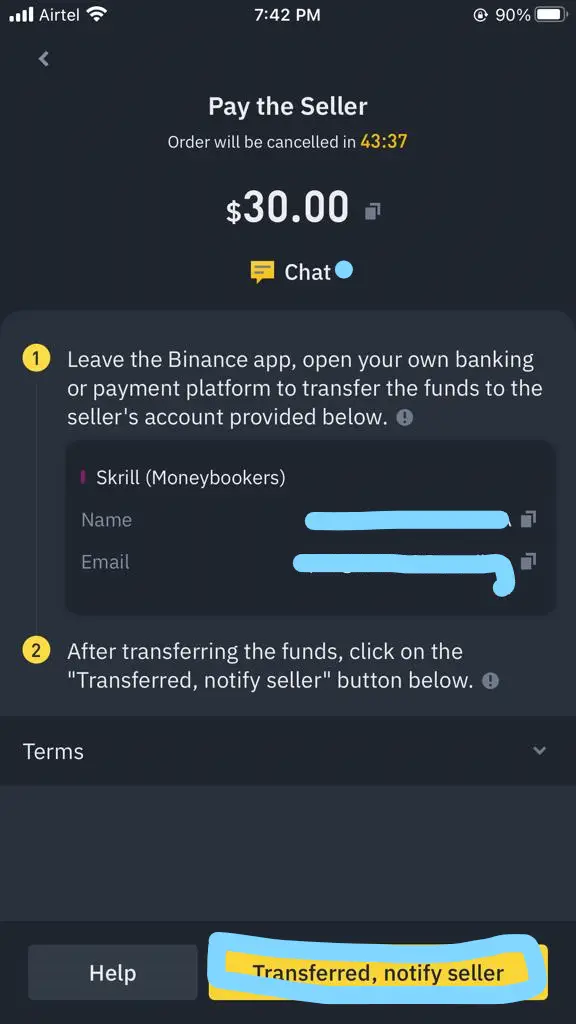
Step 6: You will be referred to a broker who will buy Skrill funds. Click on “make payment” to find your seller’s details (email address.)

receive-payment-from-skrill

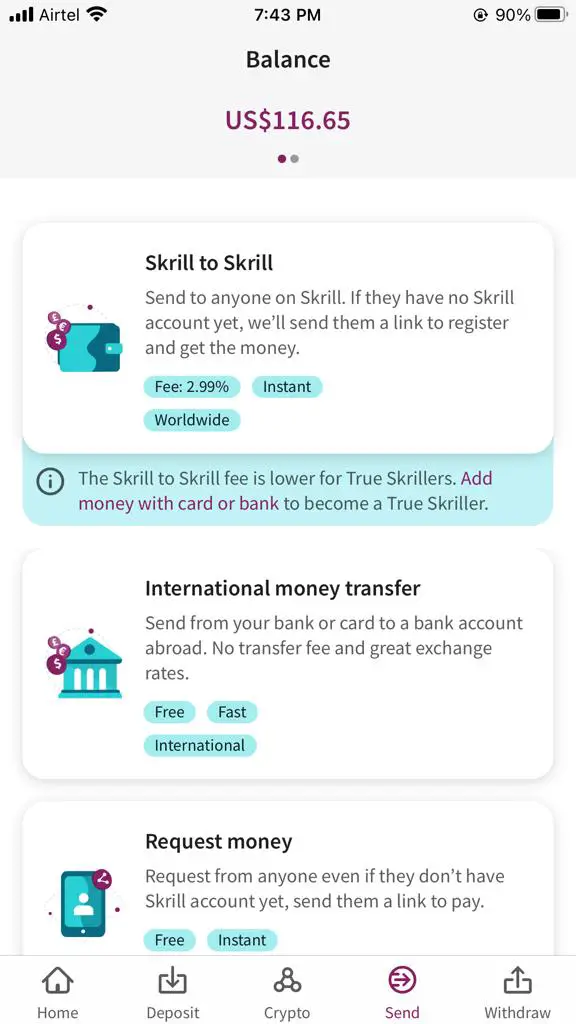
Step 7: Copy the email address and go to Skrill to make a “Skrill to Skrill” transaction.

Note: Do not close the Binance page yet.

Skrill-to-Binace-Payment

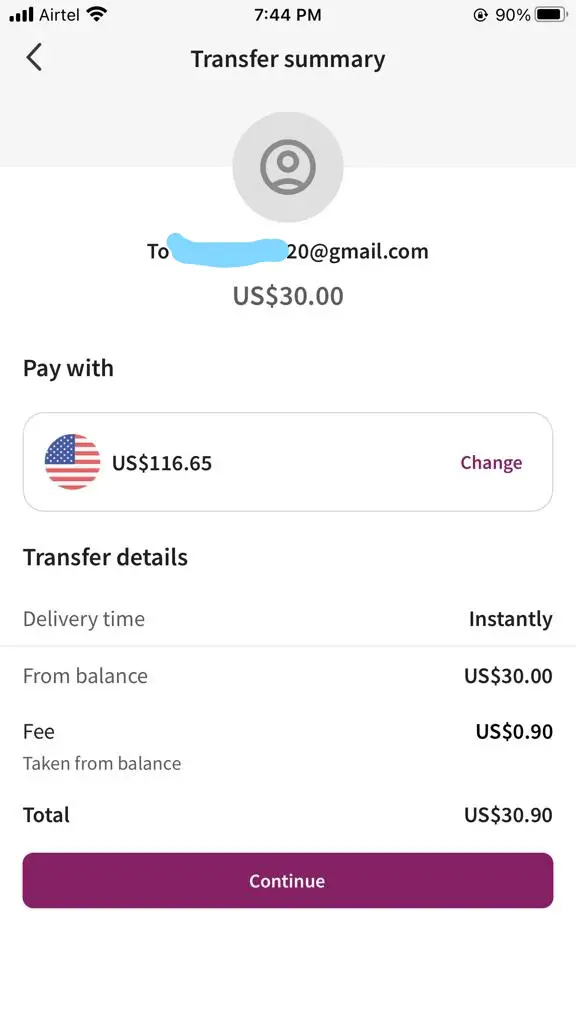
Step 8: Paste the email address on Skrill and hit “Continue.”

Step 9: Fill in the amount you are selling on Binance. It was $30 for me, so my currency was in USD.

Step 10: Hit continue. Also, note that I was charged a $0.90 fee on Skrill.

Skrill-to-Binace-Payment

Step 11: After sending the funds, go back to your Binance page, hit the “Transferred, notify seller” button, and wait to receive payment from Skrill. Mine was sent 13 minutes after to “Funding” on Binance.

receive-payment-from-skrill

Skrill-to-Binace-Payment

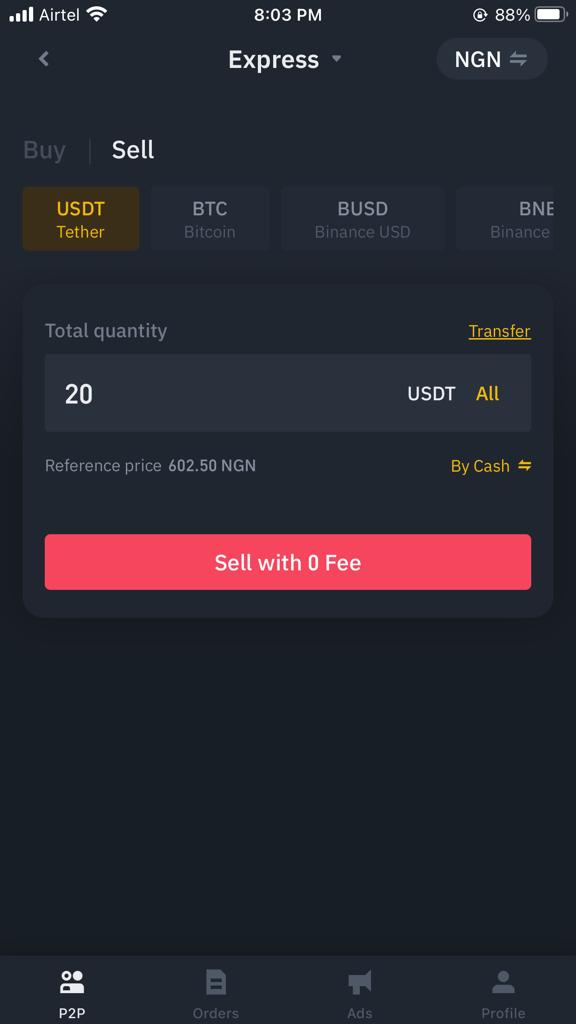
Step 12: I could sell the USDT via P2P at this point. Notice that the status was still “express,” but the currency was now “NGN,” activity was “sell,” and the coin was “USDT.” I wanted to sell 20USDT, and I hit “Sell with 0 Fee.”

Skrill-to-Binace-Payment

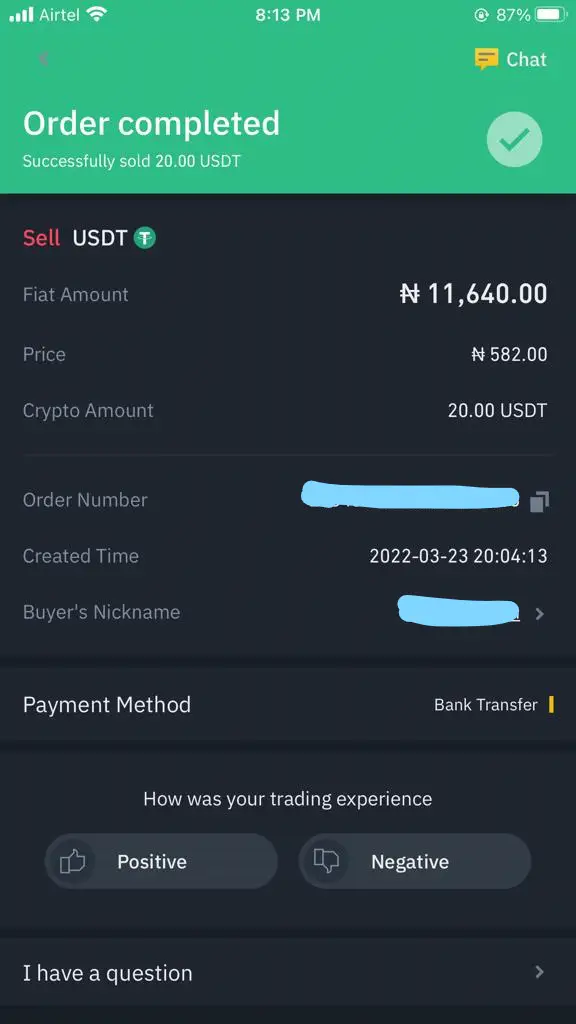
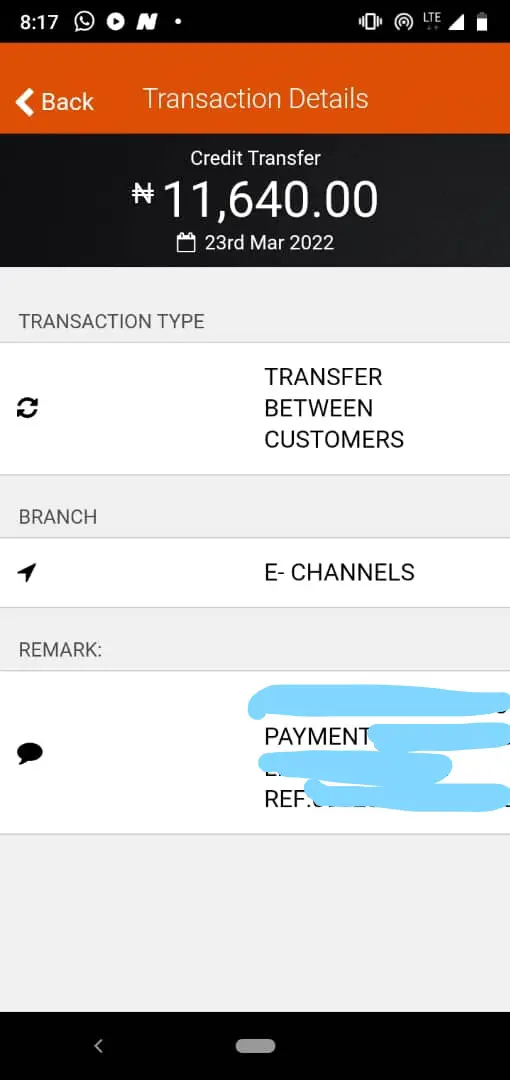
Step 13: I was paired with a buyer who wanted my USDT, and in less than 10 minutes, I received my money in my GTB account.

Skrill-to-Binace-Payment

receive-payment-from-skrill

The entire process took about 36 minutes.

How much can I withdraw from Skrill through Binance?

You can withdraw as much as you have available in your Skrill account. However, note that a higher amount equals higher charges.

[irp posts=”880″ name=”PiggyLink: You Can Now Accept Payments With PiggyBank”]

Can I withdraw funds from Skrill without a bank?

Yes, you can. You can decide to keep your USDT in your Binance wallet to trade or make payments directly.

Can I send Mastercard funds from Skrill to Binance?

This lesson I learned from a friend’s experience. Request that your client or whoever you are receiving the Skrill funds from sends the payments only with a visa card (if that is possible).

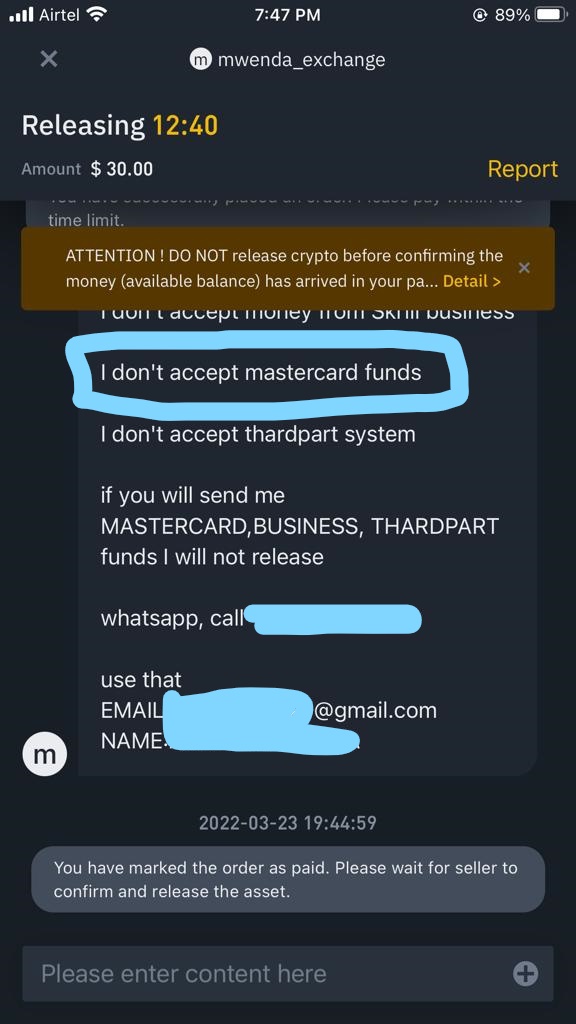
Some sellers on Binance do not accept Master card funds, like mine.

Skrill-to-Binace-Payment

So you may have to cancel that order. And, you only get three canceled orders on Binance per day, after which you’d have to wait till the next day.

Bottom line

There will always be charges (for now) if you do foreign transactions. But receiving payment from Skrill through Binance straight to your naira account comes with very reasonable fees. Plus, it is fast enough.

Now, all our tech bros, women in tech, and online sellers can do business with clients all over the world and get paid seamlessly.

I have been using this payment process for about eight months now, and I have no regrets. You can get the Skrill app and do your Skrill to Binance transactions any day, anytime.

How to Make Money From Printivo’s Marketplace

Printivo marketplace is a designer marketplace where anyone can create and sell designs on print products and earn 15% royalties on their designs. Simply put, you create your designs on their platform and they print them!

Here’s why you need the Printivo Marketplace

An Easy Business Model

You don’t need capital to start up the business. With the Printivo Marketplace, You get your own custom-made online store with creative designs from which your customers can order. No sourcing for an office space or running around for customers.

You can get print materials with ease

No more bickering with printers at Shomolu over your association’s merchandise. All you need is your smartphone and your items would get delivered to your doorstep

You get to make money!

Who doesn’t like the money? With the Printivo Marketplace, you earn a 15% royalty fee on all purchased merchandise in the store. Now, imagine selling 100 items in your store? Let’s leave the calculation to you.

You can get started by visiting: https://printivo.com/sell

Product Management Resources for Nigerians

0

We made a list of 5 platforms where you can learn Product Management a while ago. You can read it by clicking here.

Podcasts, salary negotiations, remote work, courses, programs and fellowships, groups, events, communities etc… Purity Waigi created this stack of Product Management resources for herself and other curious product folks. Click here to check it out

20 Websites For Downloading Free Stock Photos

1

Stock photos are used by websites and blogs as images and graphic representations of what an article is about. Many times, stock photographers put their photos out there on photography websites for free, which means that the photos are under the Creative Commons Public Domain or have no copyright restrictions before the public can use them. Stock photos can also come at a price where photographers sell their stock images on microstock photo websites like Shutterstock, iStockPhoto etc. 

If you are looking to download free stock photos, then you need the images that don’t have any copyright licensing or are under Creative Commons. Using these images means that you are free to edit them to your liking without asking permission from the photographer or paying a fee.

It is also a cheaper option for many blogs and websites as they don’t have to buy images for every blog post published. Premium stock photos have their advantages as well like they are usually more personalised to the reader and are of higher quality. But that’s not why you’re here. Let’s share 20 of the best websites where you can grab stock photos for free.

20 Websites For Downloading Free Stock Photos

Nappy.co

Nappy is a great website for free stock photos. Nappy mainly publishes photos of black and brown people. This sets Nappy out as different from other free stock image websites. Nappy is a great photo website doing the Lord’s work for black people representation. So, if you need free stock photos of black people, Nappy is a great place to branch. 

Pixabay

Pixabay is a fantastic option for getting free stock photos. Pixabay allows users to get royalty-free images, videos and graphics. Pixabay has over 1 million free stock photos for you to look forward to! 

Unsplash

Unsplash is like a huge photography community where creators from all over the world can share their free stock photos on the platform. Users can like, share and download these images for both personal and commercial use. 

Freepik

FreePik is a great platform to get free graphic resources, vectors, stock photos, icons and more. As a creator, FreePik is a great place to get graphics for your creative project.

Pexels

Pexels is available even in-app format for Android devices. They have up to 3 million free stock photos and videos for your use. 

Stock Free Images

StockFreeImages is a good option for you to download free stock photos from. There are over 3.4 million free stock photos available on their website! 

Free Images

FreeImages has different photo categories for users to browse through to find what they want quicker. FreeImages has over 300,000 free stock images on their website. 

Free Range Stock

FreeRangeStock is a website where you can download free stock photos in high resolution for free. To start downloading photos from there, you need to have an account. 

Free Photos Bank

FreePhotosBank is a great website for free stock photos. All their photos are under the Creative Commons License and are free to download by users. 

PicJumbo

PicJumbo is a free stock photo website that was created by designer and photographer Victor Hanacek. PicJumbo is a great place to source free stock photos for your creative project or blogs. 

Pixabay

Pixabay is an online place where creatives can download free stock photos shared by photographers. Pixabay has all its images licensed under the Pixabay License. 

The Chive

TheChive is a platform for sharing weird and funny photos. TheChive has photos of different random things like women, funny images and more. The images are free to download. 

Worth 1000

Worth1000 is now a part of designcrowd.com and the website was originally a place for photography contests. It was opened in 2002 and the images shared by competitors were completely free. You can still find the images on Design Crowd. 

Imgur

Imgur is an image hosting website where popular images from the internet are hosted. Images from Reddit are especially posted on Imgur. And the images are free to use. 

Canva

Canva is popularly a design and photo editing platform. But there is also the photo collection aspect of Canva where users can browse through over 1 million images hosted on the Canva website. 

Gratisography

On Gratisography, images are split into different categories which include nature photos, background photographs and more. Gratisography is a website where a quirky collection of images can be downloaded for free. 

Snapographic

Snapographic is a website where photographers share free and license-free stock photos to the public. You can get free stock photos from Snapographic. 

Life of Pix

Lifeofpix is unique in the sense that users can search for free stock images on the website based on colours or the format of pictures. 

Foter

Foter is a website where images related to interior designing are shared. All interior decor related images shared are free stock images that are free to use. 

Creative Commons

Creative Commons images are free to download and use. The website has been in existence since 2001 and its popularity continues to grow. Anything from literary works, research works, music, images etc., are all shared on the website. 

Check out my YouTube videos

X