Sorting by

×
Home Blog Page 16

USSD Codes for Loans in Nigeria (2022)

0

There are apps for almost everything these days except apps that can generate fast foods and apps that show you USSD codes for loans in Nigeria.

Anyways, You have me.

Please note that you must have a bank account linked to your mobile telephone number to perform a USSD transaction. So, you might not get a loan if there is no bank account connected to your number.

USSD Codes for Loans in Nigeria

AB Microfinance bank – *389*755#
Access bank – *901*11#
Kwikcash (Now Migo.money) – *561#
FCMB – *329#
Aledin nano – *903#
Airtel quick cash loan – *561#
Etisalat loan code – *561#.
Mtn cash loan code – *606*4#
Glo cash loan code – *322*1*04225701*Amount#
FCMB loan code – *329#.

Similar: These Platforms Let You Collect Loans with Your Phone Number

USSD Codes of Nigerian Banks

Commercial Banks USSD Code
Guarantee Trust Bank – *737#
Fidelity Bank – *770#
First Bank – *894#
Wema Bank – *945#
Skye Bank – *833#
Sterling Bank – *822#
Diamond Bank – *710#
Eco Bank – *326#
Zenith Bank – *966#
FCMB – *389#
Unity Bank – *7799#
UBA Bank – *919#
Union Bank – *826#
Heritage Bank – *322#
Keystone Bank – *533#
Access Bank – *901#

Other Financial Services

Paga – *242#
Payattitude – *569#
Quickteller – Airtel, MTN & 9mobile – *322#
Quickteller – Glo Users – *805#
Trader Moni – *540#
Verve ECash – *322*60#

Did I miss any code? Please share in the comments below.

How to Create an Alternate Email For Your Gmail Account

1

In theory, you cannot change your Gmail address. Google does not allow this, probably because your email address is tied to other Google products out there but you can create an alternate email for your Gmail account or just create a new Gmail account? I will be teaching you the former.

Before we proceed, do you know that: okeke.magnus.ifeanyi@gmail.com is same as okekemagnusifeanyi@gmail.com? You own all dotted versions of your address. You can learn more here.

This is not really related to what I’m about to show you. I just thought to slip it in as a fun fact if you don’t already know.

In this post, I will be explaining how to create an alternate email for your Gmail Account.

What is an Alternate Email?

According to Google, alternate emails are other email addresses you can use to sign in to your account. They can also be used to reach you in case you get locked out. It’s a non-Gmail email address you can add to your account and use it to sign in, recover your password and more.

How to Create An Alternate Email

You can add an alternate email address for your Gmail by following the steps below:
Visit your Google account settings page (https://myaccount.google.com)
Click on Personal Info
Click on Contact Info (Email)
Then go to Advanced
And add an Alternate Email and save
The little screenshot below will show you how as well

Google Alternate Email Kapwing

An alternate email for your Google account must be a different email service (not Gmail). You can’t use a Gmail account as an alternate email for your Gmail account.

Alternate emails

Also, you will be required to verify the alternate email address – Google would send a confirmation email to the newly added alternate email. See screenshot sample below:

Alternate email confirmation Google

You can learn more about alternate emails by clicking here.

How to Download Your Udemy Courses for Offline Study

3

I have taken all kinds of courses on Udemy. From SEO training on how to rank 1st on Google to Stock Market Investing for Beginners. On average, I take 2 courses a week – a personal decision I had to make because I stopped reading as much as I used to. How am I able to take these courses when my power goes off or I’m out of data?

In this post, I would be showing you how to download Udemy courses and watch them later no matter where you are or the smartphone you use.

What do I need?

The only thing you would need is enough space on your device to download the courses and of course, you have to have an Udemy account. You can create a free Udemy account by visiting udemy.com.

For those of you that don’t know, you get a certificate each time you finish a course on Udemy and it’s free to sign up. Although some courses are not free they are very easy to purchase and will be on your Udemy account for life. Money spent on courses is a good investment in my opinion.

How to Download Courses for Online Study

First, you need to download the Udemy App on your phone for free. This is important because you can only download Udemy courses legally with the app
Click here to download it for Android. Click here to download it for your iPhone.

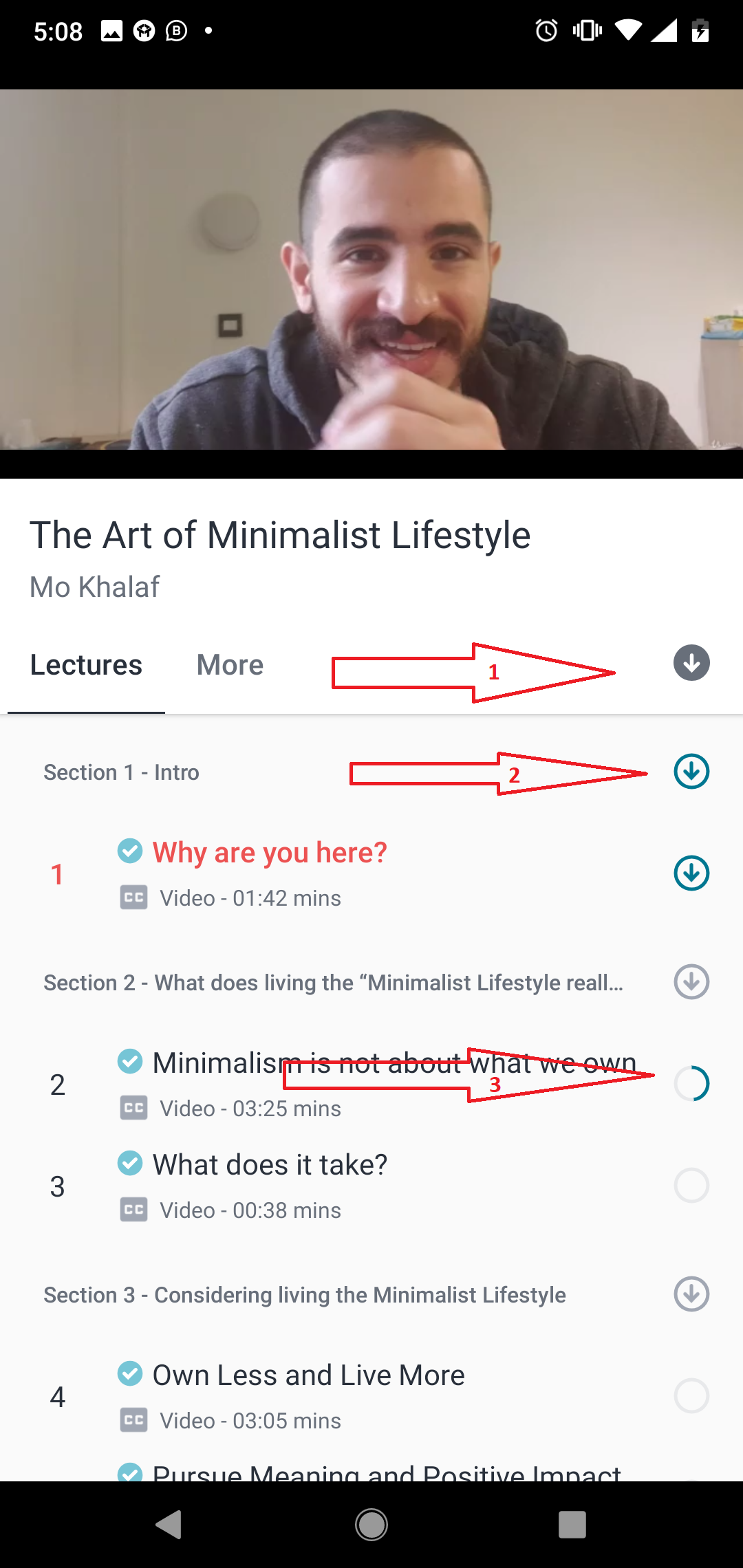
Then go to the course you would like to download and click on it to start watching it. It should look like the screenshot below when you’re watching it:

How to Download Your Udemy Courses for Offline

  1. Clicking on the icon in the first arrow lets you download the entire course, cancel the download or remove all downloads to free space.
  2. The icon in the second arrow means the course has been downloaded
  3. The icon in the third arrow means the course is currently downloading.

Conclusion

That’s not all. The Udemy app has a settings page where you can choose where your downloads should be saved – memory card or internal memory. The settings page also let you choose the quality of the video i.e 480p, 360p, 720p etc. You also get to choose whether to download over WIFI or mobile network.

The Udemy app has really helped me with my learning and I hope it helps you too. Wondering what I have learned so far? Here is my Udemy Profile.

9 Platforms That Let You Convert Airtime To Cash

2

It was almost impossible to convert airtime to cash a few years ago. At the time, a lot of businesses and consumers with a huge amount of airtime on their phones had to sell directly to friends or family who needed airtime for calls or data subscription.

It’s different now.

In this post, I will be listing 6 platforms that would buy your airtime whenever you over-recharge or just feel like selling the airtime on your phone.

Let’s get to it.

Table of Contents

Eazymobile

Eazymobile is no. 1 on our list because it has more features than most of the other platforms on this list. With Eazymobile, you can Buy and Sell Bitcoin, Buy Airtime and data, update your electricity bill, pay for your TV subscription and of course, convert your airtime to cash in no time. For the airtime conversion part, It’d only take 5 steps to sell your airtime with them instantly. Click here to go to their homepage and click on View Process to see the steps.

Another exciting thing about Eazymobile is that their airtime conversion rates vary based on market rates so you don’t have to worry about getting charged too much money. That’s not all, you can also send Bulk SMS from Eazymobile and everything happens from your neatly designed dashboard. Their Customer Support is available on Instagram, Facebook and Telegram.

Eazymobile’s office is at Shop 15, Off Alabata Road, Funaab Abeokuta
Phone: +2349021666608 | Click here to visit their website

OG DAMS

OG DAMS offer the best deals in Internet data subscriptions, airtime to cash conversion, Airtime top up (VTU), CableTV (DStv, GOtv & Startimes), Electricity Bill Payment etc. One of the things I like about OG DAMS is how their homepage and FAQ page is built. They have made it easy for you to understand the platform and how to use it. In fact, you don’t even need to finish reading this post. Just click here to check out their FAQ page and see how easy it is to sell your airtime. If you would like to register for free right now, click here instead.

The platform is also said to be 100% automated. So, you don’t have to wait many days to get credited when you want to sell your airtime or buy data. Still in doubt? They have a Telegram contact you can reach out to if you have any questions or need to make clarifications. You can also contact them on this number: 09066685702

Modelc

Modelc converts airtime to cash and the platform also has options for bill and utility payment. You can also sell and buy bitcoins on the website and app. If you’re worried about reliability, they have been in the market for quite some time and they’re very accessible, in case you need someone to talk to while carrying out transactions. They have a live chat function on their platform with options to contact them on messenger, Telegram, Instagram and of course, a phone call – +234 (0) 813 7540 652

One of the exciting things about the Modelc is the fact that you can earn as much as ₦5750, just by referring 1 person to the platform. This is the highest affiliate earning out there right now and you should take this opportunity to benefit from it. Click here to join the affiliate program.

That’s not all. They also have an Android app on Google Playstore. You can click here to install it or simply search for Modelc on Google Playstore.

Aimtoget

Aimtoget Is an airtime processing platform that allows you to convert airtime to instant cash. This platform is becoming the go-to platform to convert airtime to cash. I say this because they have a business address, phone number and some reviews by users who seem to have used it. Aimtoget converts your airtime to cash and would pay you 80% cash after conversion.

You can also buy airtime, data bundles, pay bills, send and receive money through the platform. Aimtoget also makes it easy for businesses to accept payments in the form of airtime on their websites.

Aimtoget has an app on Playstore. Don’t forget to check out the app and the reviews about it.

Airtimeflip

For an airtime conversion app, airtimeflip has one of the highest ratings on Playstore – 4.1. AirtimeFlip makes it possible for you to convert airtime to money deposited into your bank account. It boasts as one of the fastest airtime converters in Nigeria with 99% automated transaction.

They charge 19% fee on each MTN airtime transaction. So they will send ₦ 810 into your bank account if you convert ₦ 1000 airtime (19%), and so on. You check their Charges page to see a complete list of their charges. Please click here to learn more about airtimeflip.

Zoranga

Zoranga is a Nigerian mobile money service that converts airtime to cash. Zoranga caters for merchants (businesses) apart from catering for individuals. This means your business can accept airtime payments with Zoranga. You can also accept donations in airtime form if you’re a charity organisation. Please visit Zoranga.com to learn more about the platform.
They have an app on Google Playstore. Don’t forget to read the reviews.

Airtimedatahub

Airtimedatahub allows you to convert airtime of all networks to cash within a few minutes. They credit customers’ bank account within 5 to 15 minutes of the request submission, according to their website.
They charge 20% on Mtn and Airtel airtime, 25% on 9mobile and 35% on Glo.

You can give them a shot by visiting: airtimedatahub.com.
Be sure to check out reviews of the product on Playstore or elsewhere before using them.

Cheetahpay

Cheetahpay has two options: You can convert your airtime balance to cash or convert airtime pin to cash if you have physical recharge cards for sale. What I love about the platform is how detailed their FAQ on how to convert airtime to cash is. You can check it out by clicking here.

Cheetahpay has an app on Playstore with mixed reviews. Click here to read them or install the app.

UPDATED:

iPayAirtime

iPayAirtime makes it possible for you to convert airtime to cash and pay for things online with airtime. They do not charge a registration fee but only a 18% deposit fee on MTN airtime. This is the cheapest offer available online at the moment, according to them. They also have API and support for businesses, so you can accept payments in the form of airtime with iPayAirtime on your website.
They don’t have an app at the moment. You can read all about iPayAirtime by clicking here.

VTU.ng

You can convert airtime to cash online in Nigeria with vtu.ng. They payout either via your VTU.ng wallet or via your bank account when you sell airtime to them. They convert MTN, Airtel, Glo and 9mobile and pay you 80% while they take a 20% cut.

That’s all for now. Thank you so much for taking your time to read this post. Did I leave any platform (that converts airtime to cash) out? Please let me know below.
How to Make Money From PalmPay App

2

I recently signed up on Palmpay with an invitation code and I earned 500 points. The thought of trying out another app that lets you save, loan or earn money tires me these days, to be honest. But these incentives and offers get my attention. We will be talking about Palmpay App and how to earn from it.

What is PalmPay App?

PalmPay is an app that rewards you for every transaction you carry out on the platform. When I say transaction, I mean receiving money, paying your utility bill, buying airtime and everything else you can do with the app. The rewards you earn are called PalmPoints and you can use them to discount subsequent transactions.

Palmpay is almost like other fintech platforms such as OPay, KudaBank etc – They help you save, transfer, borrow and pay for utilities.

Why Is Everyone Talking about PalmPay?

Because they recently raised $40 Million to become Africa’s largest financial services platform.

Another reason for the buzz is that you get rewarded when you are referred, refer, buy data, transfer money or simply pay for things through the app. There seems to be a reward for everything you do on the Palmpay app.

Is PalmPay Free?

Yes. It’s free to install the app, sign up etc. You can transfer money to other PalmPay wallets for free and transfer to bank accounts for just ₦10.

Can I take Loans with Palmpay?

No. Not at the moment. The feature doesn’t exist on the app at the moment but I have a feeling they are working on this.

How to Make (and save) Money From Palmpay App?

PalmForce: The first and best option to make money while using Palmpay app is to join their PalmForce program. It’s free. Click here to learn about it and register

Bonus on Airtime: You get a 10% bonus in the form of PalmPoints when you buy airtime. Use your PalmPoints and save up to 50% on future and airtime and biller purchases.

Bonus on Bill Payment: You get a 5% bonus in the form of PalmPoints when you pay for a bill through Palpoints.  These bills include your water, cable or electricity bills.

How to Make Money From PalmPay App

Bonus on Top Ups: You earn 100 naira (100 PalmPoints) bonus when you top up your Palmpay wallet with 1000 naira. This bonus is given once a week.

Invite and Earn: You would earn ₦300 each time someone signs up on PalmPay with your referrer code and they carry out their first transaction. Your friends will also benefit. They would get 75 points after registering with your referral code and another 75 points after they carry out a transaction.

How to Invite Friends to Earn on PalmPay

Go to your Menu, you would see Transaction history, Profile, Contacts and more.
Click on Invitation to see your invitation code in form QR code, URL and code.

You can share your invitation code with friends and family. You will both earn points when they register with your code or through your link.

You can click here to register or use my code F4IK17

Camtoplan vs Google Measure: Which is Better?

0

Google Measure and Camtoplan are augmented reality applications for mobile devices that can be used to measure all sorts of objects in the real world with your phone.

I have been using Google Measure for months now. 4/5 months, I’m not sure anymore. Then I recently discovered a similar app called Camtoplan through an ad on Instagram. So I thought It would be cool to talk about both apps and figure out which is better and why. Here goes:

Which Measures better?

They both ask you to move your phone around slowly when you’re about to measure your surrounding but Camtoplan requires you to upgrade to premium to be able to measure vertically. The free version of Camtoplan only measures horizontally and it does it very well but it’s very limiting because you can only measure horizontally. So, for this round, I would say Google Measure measures better because you don’t have to pay a dime to measure objects in your surrounding both vertically and horizontally.

Ads

Camtoplan is riddled with ads but there are no ads in Google Measure.

History and Accessibility

Camtoplan does this better. It saves your past measurements in a folder. You can access these measurements when you launch the app. It also saves your measurements in floor plan layouts – Cam to Plan, go figure.

Google Measure would exit the app before you can save a measurement and would also exit when you want to access your gallery for previous measurements.

What I do after the measurement is take a screenshot of my screen to save that measurement. That’s on Google Measure. Camtoplan does not let you take screenshots. Everything happens within the app. Reminds me of Kudabank, ugh!

Cost

Google Measure is free and might remain free (like most apps by Google)
Camtoplan offers 7 days free trial and ₦10,000 ($27) for a yearly subscription. The premium plan unlocks vertical and expert mode, allows you export to .png and dxf, and also stops ads from popping up every now and then.

Extra Features

Camtoplan has a cool 2D/3D feature that lets you preview your measurements in both 2D and 3D.

Google Measure does not have any extra features apart from the fact that it lets you measure in inches & feet, metres & centimetres like Camtoplan.

Conclusion

We have reached the end of the article and I would like you to be the judge here. Which of these apps do you prefer and why?

Know a similar app? Please leave them in the comments below.

How to Turn Your Instagram Profile into a Website in Seconds

1

Are you a creator? Have you been wishing there was a way to tell everyone you own a website or portfolio but you don’t want to give them your Instagram profile link? Right. I recently discovered a web app that lets you turn your Instagram profile into a website in seconds. This web app is called Zine.

What is Zine?

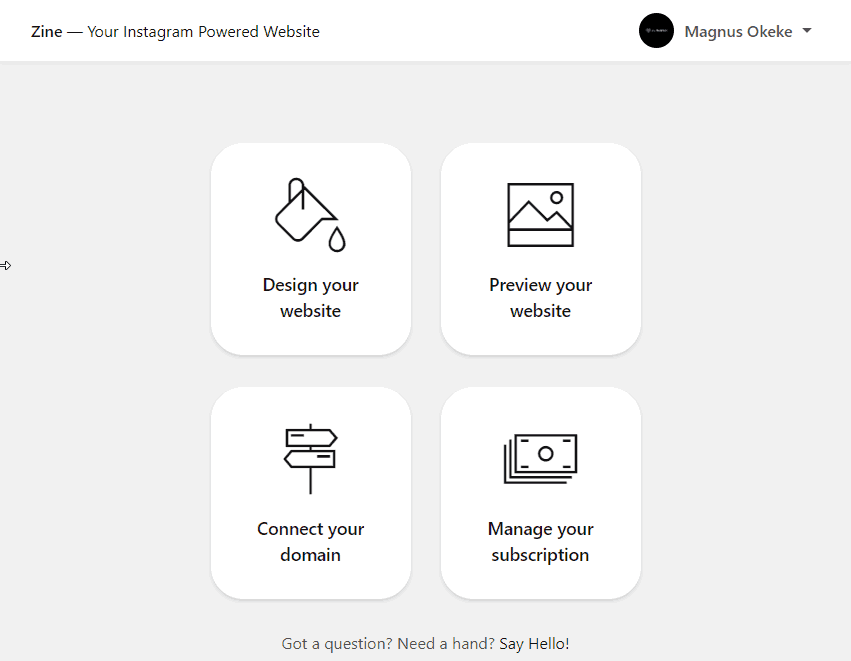
Zine.press takes the stress of worrying about how and when you would update your website by helping you turn your Instagram profile or feed into a website. So whenever you post on Instagram it gets updated. You can magically turn your profile into a website by visiting app.zine.press and login with Instagram.

Will it affect my Instagram?

No. It will not. Connecting Zine to your Instagram is basically like connecting your Instagram to your Facebook account.

Is Zine Free?

Yes, to a huge extent – You can customize fonts, layouts and even add your own logo for free but your URL will look like this -> sitename.zine.press
If you would like to connect your own custom domain (like yoursitename.com) you would have to pay $7 monthly. Basically, the pro version of zine costs $7 per month.

zine.press iammagnus.com

Can Zine Work for Business Accounts?

Yes. My Instagram account is a business account and it works great. Here is my Zine Profile

Honourable Mentions (Milkshake)

There is an app called Milkshake. It turns your link in bio into an insta website. Instead of the usual link to other pages or websites that linktr.ee provides, Milkshake gives you a more customizable interface that allows you to create a mini-site for your Instagram.

You should try Milkshake if you need a website but don’t have all that time, knowledge and patience to create one. Milkshake is free.

That’s it on how to turn your Instagram profile into a website. Do you know any other tool or tools that do this? Please leave them in the comments below and I will check them out and feature them as well

How to Receive Western Union Payments In Nigeria Without Leaving Your Home

1

I have received money from a client through Western Union twice. I had to go to the bank on both periods. The funny thing is not all banks in Nigeria process Western Union payments. For some reason, Guaranty Trust bank doesn’t, as big as they are.

In this post, I will be showing you how to receive Western Union Payments in Nigeria without leaving your home. I will also include a list of banks that process Western Union Payments in Nigeria just in case you live close to any of them.

How do I receive Western Union Payments from Home?

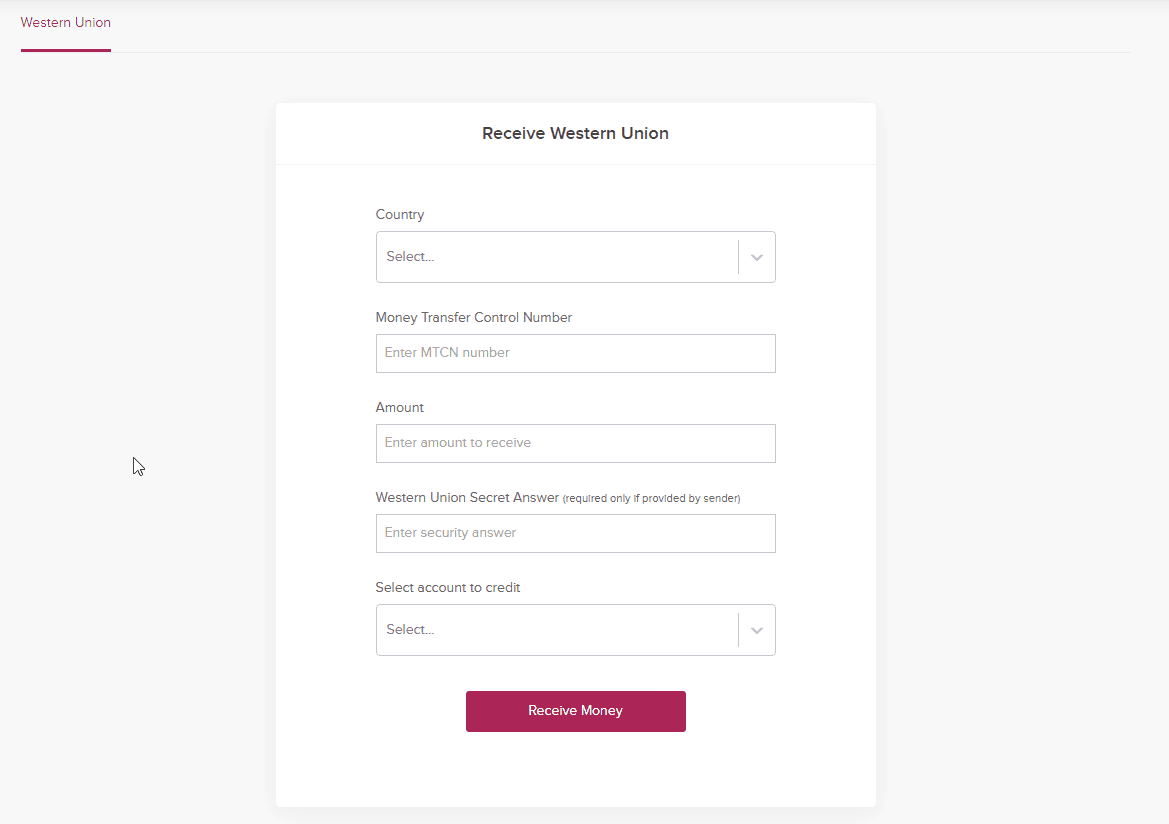
So, the platform that allows you to receive Western Union payments straight to your bank account is Wema Bank’s ALAT. Alat is Nigeria’s first fully digital bank. Their account opening, card collection and verification is all done online from the comfort of your home.

I wrote about ALAT in 2018. It is owned by WEMA bank. You can read all about it by clicking here and maybe open an account for free.

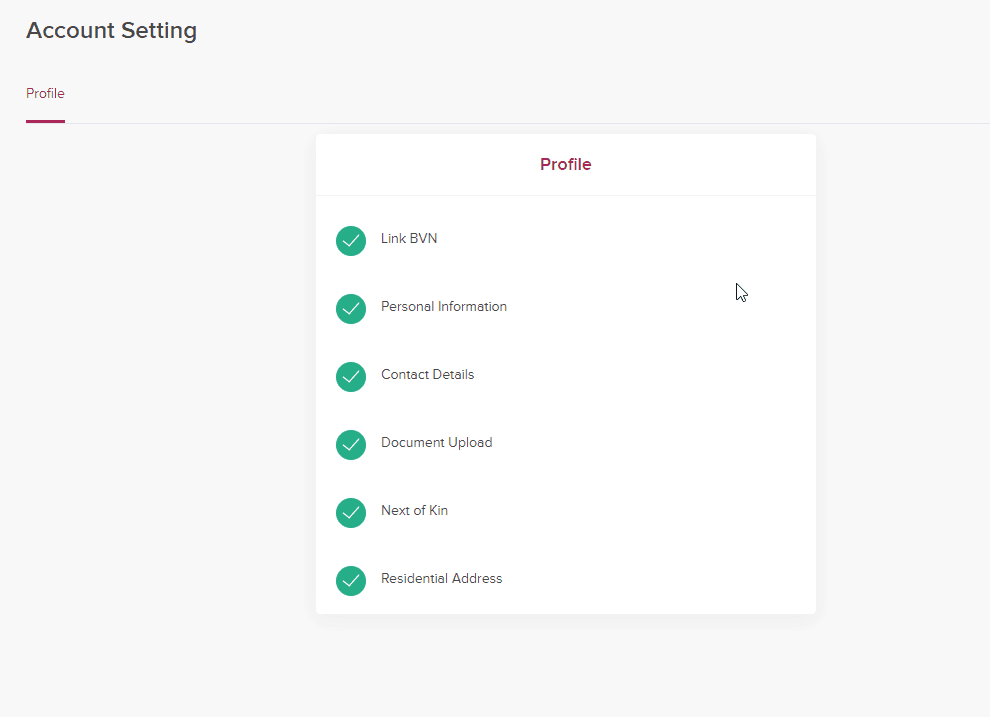
You would need to fill these details after opening an ALAT account (see screenshot below)

ALAT by Wema verification

Once you have uploaded and filled your details, your account will be verified to receive Western Union Payments and unlocked to other cool features.

Wema-Alat-western-Union-iammagnus

How Much Would I Pay to Receive Western Union Payments in Nigeria?

The conversion is usually stated by Western Union during the transfer and the sender pays the processing fee as well. It is also stated on Western Union’s website that US dollar payments in Nigeria are available at no charge to the receiver. So you don’t have to worry about this. The sender pays the transaction fees.

Banks That Process Western Union Payments in Nigeria

Here is a list of banks that process Western Union payments in Nigeria (According to Westernunion.com). You can walk into any of these banks to receive your payments and you would not be required to pay any transaction fees.

– First Bank of Nigeria PLC (all locations)
– Zenith International Bank (all locations)
– Wema Bank (all locations)
– Standard Trust Bank (all locations)
– Oceanic Bank International (limited locations)
– Ecobank Nigeria PLC (limited locations)
– AllStates Trust Bank (limited locations)
– NBM Bank (limited locations)

You would notice Wema bank is on the list. They own ALAT.

So, yeah, that’s it. ALAT also allows you to transfer money and pay bills at any time. You can register by visiting alat.ng and use the referral code: 4RFRB6 so we can both get rewarded.

How to Add a Live Chat to Any Link you Share

0

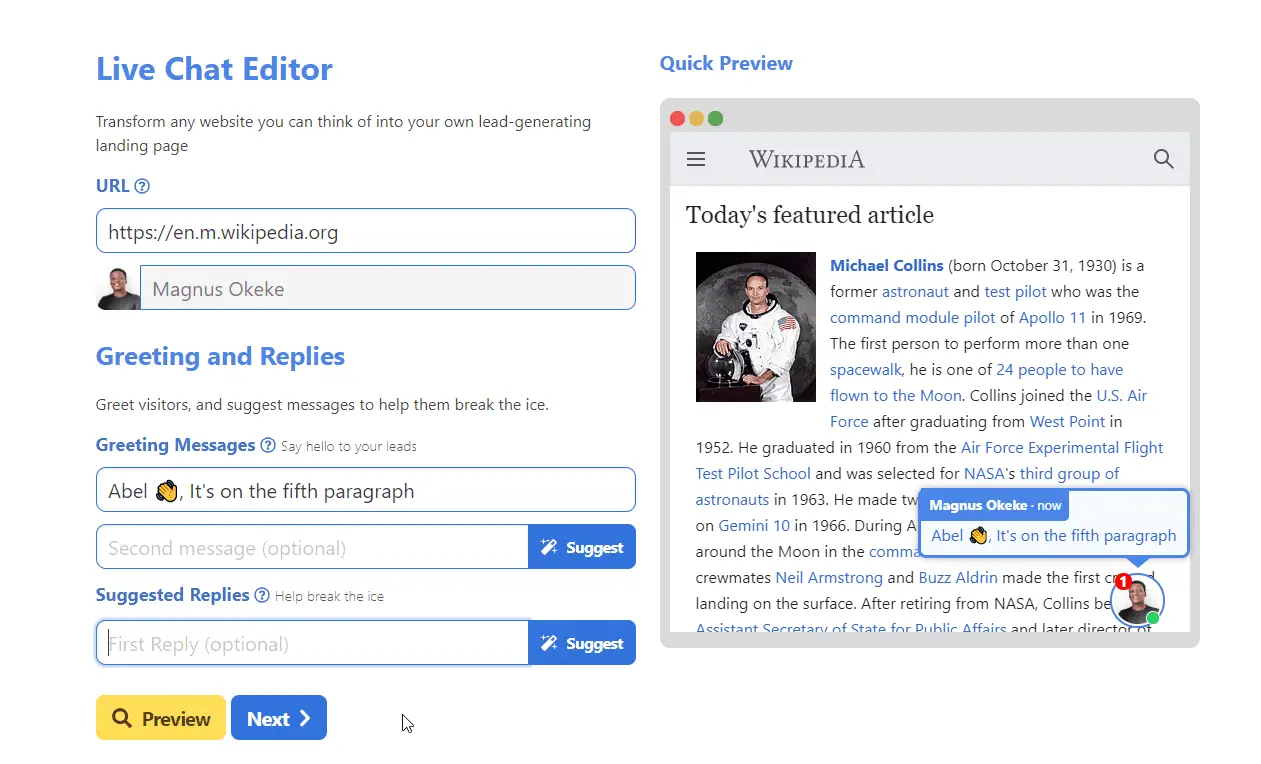
From time to time you want to share a link with someone and also keep in touch (with them) while they are checking out the page you just shared, right? I haven’t really thought about it until I discovered an amazing tool that lets you add a live feature to any link you share with friends, family or basically anyone else. The name of the product that lets you do this is Bespoke.

Bespoke Live chat iammagnus

What is Bespoke?

Bespoke attaches a live chat to any link you share, enabling you to turn your influence into sales. Chat boxes appear natively embedded on the web pages you share. It could be any web page, including Wikipedia, Medium or a blog post out there.

I see Bespoke as powerful digital marketing addon and I’m not the only one who thinks every digital marketer needs it.

“Simply sharing other people’s content doesn’t generate leads — you need to get your audience into one-on-one sales conversations. With Bespoke, each link you share becomes customer outreach.” – Louis (One of the makers of Bespoke)

Is Bespoke Free?

The free version allows you to create and share unlimited links without support or integrations.

The Startup plan lets you created unlimited links, unlimited integrations and support for $4/user/month. The Enterprise version gives you everything unlimited for $399/month. The enterprise vision sounds great for big teams and organisations – you won’t have to pay per user per month.

Additional Features

Bespoke also a Dashboard where you can track the number of links you have created, share them on social media and chat with users who are using the links.

They are also working on a publisher program that would allow publishers and creators to earn revenue when they enable Bespoke on their website.

I cannot contain my excitement about this tool because there are so many things I could do with it. I see the opportunities! Do you?

Visit bespoke.app

Tools for Collecting Emails During a Giveaway

0

As stated in my new book, The Money List, one of the questions I get asked a lot by visitors is “what are the tools for collecting emails during a giveaway”

It’s usually something like this:

Hi Magnus, what plugin do you use to collect emails while doing a giveaway? I want to give out a free ebook but I would also like to collect the visitor’s name and email in the process.

There are a few plugins you could use to achieve this, especially on WordPress.

Now, I understand that your blog might not have been built with WordPress and that’s fine. I have included other tools that would not require WordPress to run. But let’s start with the ones that would work with WordPress first.

For WordPress Users

Email Before Download by M&S Consulting
Email Before Download presents your users with a form where they submit information, like their name and email address, prior to receiving a download. This plugin integrates with the popular Contact Form 7 and WordPress Download Monitor plugins, allowing you to create any form you like and manage/monitor your file downloads.

Download After Email – Subscribe & Download Form Plugin by MK-Scripts
This WordPress plugin makes sure a visitor enters his/her email address before the download link will be sent via email. The secure download link can be used once by the relevant user and the download process is protected against unauthorized use. You can choose whether to send an email notification and to which email address it should be sent.

Not Using WordPress? Try these

MailChimp: MailChimp has a landing page feature lets you create a landing page for your book, app or any other product you would like to sell or give away. You can choose what happens when users submit their details on the landing page – i.e allow users to download a copy of your book after they enter their email address and name. You can learn more about Mailchimp Landing Pages here.

Sumo.com: Sumo is a software that helps you turn your visitors into customers, grow your email list, reduce cart abandonment and many more. You can collect emails with Sumo and give something out for free or send the users to a page after they drop their email addresses. Please visit sumo.com to get started.

Sumo.com iammagnus

Facebook Ads: I’m not a Facebook Ad expert but I hear you can collect emails while running a Facebook ad. Facebook Ads are obviously not free but If you are looking to spend and also get value for your money then try this. You can Google “How to Collect Emails with Facebook Ads” to get started.

Gleam.io: Gleam is a multipurpose web app for capturing emails while organizing a giveaway or event. It is one of the best tools for collecting emails while you’re organizing contests, trying to get app downloads, tracking tweets and more.

With gleam, you can create a landing page for almost anything and collect emails from there. You can get started with gleam.io

Check out my YouTube videos

X