Sorting by

×
Home Blog Page 12

7 Powerful WhatsApp Tools to Grow Your Business

0

WhatsApp Tools are making buying/selling easier than ever!

If you are a small business owner that is looking at attracting and keeping more customers/clients through Whatsapp, it is entirely possible. Whatsapp is currently the most used and most popular messaging tool in the whole world. More than 1.2 billion users use Whatsapp every month. Small business owners, therefore, use Whatsapp as a means of communicating with their customers and clients. Many times, these business owners need a marketing tool that can help them market their services in bulk to clients, and their products to customers. This calls for ways of growing a business on Whatsapp since it is a wonderful platform with a wide number of users.

Many business owners are searching for tools that they can use on Whatsapp that will make it easier for them to grow their business through the messenger platform. In this article, we will be sharing 7 powerful Whatsapp tools that you can also employ to grow your business through Whatsapp.

Reminders by Anydo

This useful Whatsapp tool allows you to set reminders and create tasks. As a business owner, there are probably a lot of things you need to remember to do. It can be extremely confusing try to keep up with all of these tasks by yourself and on your own. This tool is not free but for just about $3, you can gain access to it. The tool is available on all devices in which Whatsapp is enabled. The tool is conversational in nature and you will love it.

WhatsApp Chat for your Site

Do you want to be able to chat with visitors that come to your website through Whatsapp? Then this online tool is for you. You get to customize the chat button that your customers will use to communicate with you. There are also Pro features that you can get access to which are optional. The Pro features are not free and cost only about $2 in a month. Once you have signed up for the tool, the code that you will add to your website will be sent to your mail for you to start engaging with your customers and clients on Whatsapp right there from your website!

WhatsApp Short Link Generator

This free tool is another one that you can utilize to grow your business through Whatsapp. All you have to do is add your Whatsapp phone number in its international format to the form request on their web tool, then you add the message that you want to display to your customer, then you add a long URL. The tool will automatically create a shortened URL for you.

WhatsApp Chat + Abandoned Cart

This App is available on the Shopify app store and was created by a company called SuperLemon. The app allows users to have free access to the tool for a period of 30 days. That is the free trial period. The App has features like automated cart recovery, 100% free Whatsapp chat and more. This web tool also allows you to effectively create a quick customer service Whatsapp chat button.

Send Whatsapp Messages Without Saving to Contacts

This free web tool allows you to be able to send Whatsapp messages to your customers that are not in your address book. Al you have to do is to type the customer/recipient’s phone number in the input box on their website and click on “send message”. It takes just about 3 steps to get started using this service. The phone numbers you enter have to be with their country codes.

Timelines.AI for WhatsApp

This tool will definitely help you to grow and gain more customers and clients through Whatsapp. This tool is built for teams and businesses that have to face customers repeatedly. This tool is all you need if you want to retain more of your customers and clients, manage customers efficiently and improve the awareness of your brand. This tool from TmelinesAI will help you to stay committed to responding to your business messages.

WhatsForm

Create WhatsApp forms with no code 🤩

WhatsForm is built for those who manage their business through WhatsApp conversations.
1️⃣ Create forms to collect data inside WhatsApp
2️⃣ WhatsApp guarantees 98% open rate for each message
3️⃣ With all the gathered data, Business can operate 2x faster

In conclusion, these 7 Whatsapp explained above will help you to stay up-to-date with your customers and clients and help you grow your business too. Many of these tools are completely free to use and even the ones that charge, need just a few dollars and you have ultimate access. So, why not give them a try?
 

7 Android Apps to Boost Your Productivity By 1200%

0

Okay, maybe 1200% was a little bit of a stretch but you’ll agree with me that gone are those days where the use of a phone is only limited to making and receiving calls. These days, a mobile device is much more powerful than you ever imagined.

Mobile devices and smartphones are like super personal computers, and with the right set of apps, they can serve as the best productivity tools to increase your maximum productivity exponentially.

Here are the 7 Best Android Apps to boost your productivity arranged in no particular order.

1. Forest: Stay focused

Forest: Stay focused - best android apps for productivity

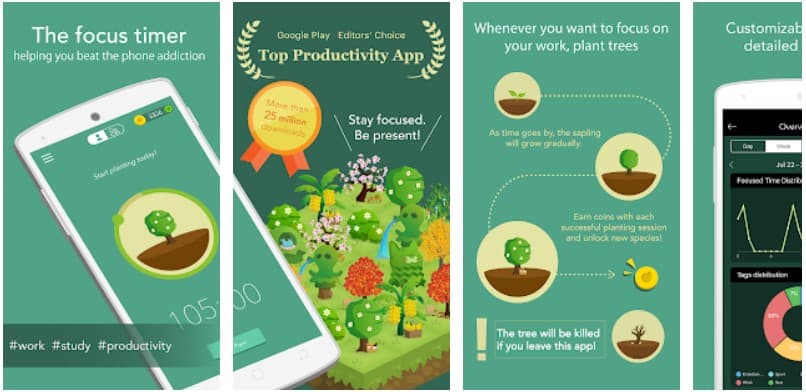
Forest to us is one of the best android apps to boost your productivity. It is a unique productivity app that helps you overcome phone addiction and stay focused. This app will help you stay off your phone for some time and focus on getting your work done. It is in the form of a little game that allows you to plant a seed in the forest.

This seed progressively grows into a big tree as time goes by. However, the tree begins to wither and eventually die each time you leave the app and start using your phone. The game is designed to help you beat procrastination and increase your productivity, thereby making you hit your goals faster.

2. Focus To-Do: Pomodoro Timer & To-Do List

Focus To-Do is a productivity app that combines Task Management with Pomodoro Timer to help you stay motivated and focused on achieving all your tasks and goals (both short term and long term). It’s the best app you need for managing and keeping track of your calendar events, Reminders, Tasks, Lists, Checklists, Grocery lists.

Thus, helping you cultivate the discipline of focusing on your study & work and ultimately keeping track of your working hours. The app is super easy to use; all you need to do is to pick a task you want to accomplish, set the timer, stay focused, and keep working until you finish the task.

3. Criminal Case

While Criminal case isn’t technically an app, it is one of the best hidden object games available on the Android platform today and is something you can jump on in your free time. Hidden object games like Criminal case have concealed clues to solving mysteries in the game, you just have to find them. This sharpens your mind over time and helps your brain focus on finding and doing what it needs to.

As you unlock clues in the game, your mind stays ahead and helps you solve similar complex real-life problems as well plus you can totally use it to pass time while you chill.

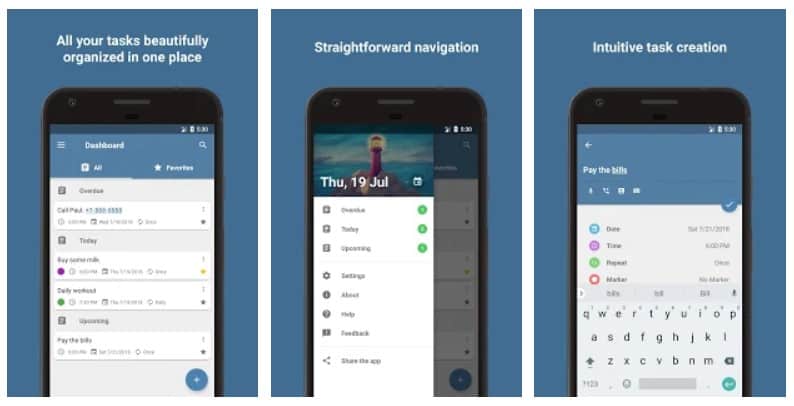
4. Reminder with Alarm

Reminder with Alarm android apps for productivity

Reminder with Alarm is a timely reminder app that helps you not to miss out on important schedules and things. Sometimes you might get so engrossed with the daily activities that you miss out on some important schedules and deadlines. But with an intuitive reminder app as this, you will never have to miss out on work schedules, deadlines, birthdays, anniversaries, taking medications, errands, making scheduled calls, etc.

Having this app in your smartphones helps you stay organized. You can use it as a handy tool to remind you of all your daily routines. It has a synchronization option that gives you reminder notification across all your devices.

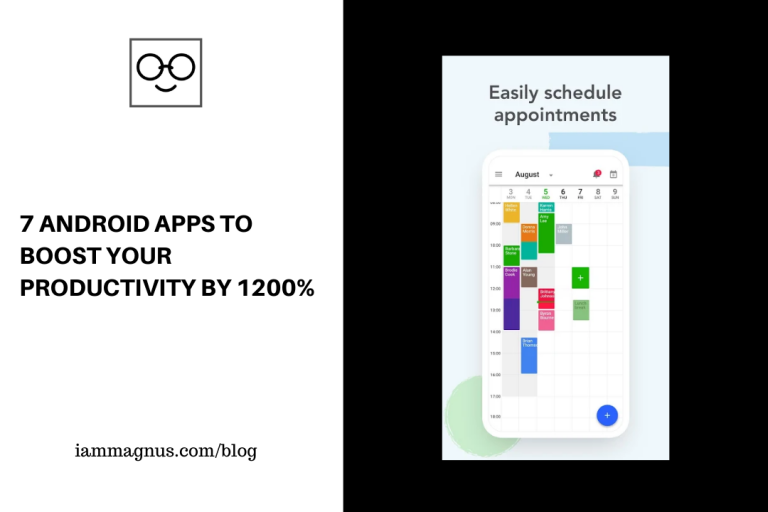
5. Appointfix: Appointment scheduling app

With Appointfix, you get to fix appointment schedules professionally and effortlessly. It is a must-have appointment scheduling app for all business owners. If you’re more accustomed to the old-fashioned book appointment scheduling system, then it’s time to upgrade with this handy app.

As a business owner, you can leverage Appointfix to keep track of your business schedules and create unlimited appointments easily, even if you’re busy. It is an excellent app that helps you to remember your client’s requests and peculiarities.

6. Routinery: Ritual/Routine

Routinery: Ritual/Routine apps for increased productivity

A wise man once said, “your life is a summation of what you do every day”. You cannot talk about maximum productivity without daily routine/rituals. Routinery is a productivity app that helps you become more disciplined in maintaining daily routines and rituals. If you faithfully keep to your schedules and engage in your daily routines, nothing will stop you from hitting your goals. This app was designed based on behavioral psychology.

It’s easy to use and highly effective. All you need to do is to make your routine list every morning with a reminder, and the app will help you keep to it.

7. Bills Reminder

As the name implies, Bills Reminder is a handy bill organizer app that keeps you reminded of all bills you need to pay as at when due. It’s a highly useful reminder tool and easy to use. Enter the details of the bill payment (the amount and due date), and this app will remind you by default at least 5 days before the due date of the payment.

You will always receive reminder notifications every morning until you make the payment. With this handy app in place, you’ll never have to forget important bills you’re to pay and subscriptions you’re to renew again. More so, it helps you stay organized and prepared for such payments.

Note: Most of these apps are also available on the iOS app store or have close substitutes.

Read next: Productivity: 8 Chrome Extensions To Stop the Too Many Tabs Syndrome

5 Places to Download Free Premiere Pro Templates

0

Introduction

Adobe Premiere Pro is a video editing software that was developed by Adobe. It is commonly referred to as Premiere Pro. Adobe Premiere Pro makes use of motion graphic templates that are used to add effects in videos editable videos. These templates are designed to be used very easily along with their controls. These Premiere Pro templates are usually imported into the project that is being worked on, in the Premiere Pro application.
But the thing with Premiere Pro is that the software is not free. Users need to pay a subscription fee of more than $20 every month to access Premiere Pro and its templates. Not everyone can afford that figure every month. This calls for other sources and places where one can get Premiere Pro templates for free. In this article, we will be looking at 5 awesome places on the web that you can access Premiere Pro templates for absolutely free. Keep reading to know more.

Mixkit.co

Mixkit is a free gallery of extraordinary stock video clips, astounding stock music tracks and remarkable video templates.

Mixkit offers you absolutely free templates and assets for your video editing projects. On Mixkit, you have access to varieties of Premiere Pro video templates.  All of these contents are available for free. The Mixkit library is a huge one that offers you a wide range of high-quality items to choose from. You have access to video backgrounds, Zoom virtuals, video clips relating to nature, lifestyle, food, animals and so on. Templates like Openers, Instagram, Youtube etc., are all available on Mixkit. The Premiere Pro templates are so many that you can search through them with the search bar. The Premiere Pro templates are divided into different categories such as 3D Spin Transition, Multi-Circle Transition, Frame-Split Transition and more.

Motion Array

Motion Array is a good source of Premiere Pro templates that is almost free. There are up to 517,000 templates available that are all waiting for you to download. And they are all very free to access and use on Motion Array. In order to gain access to some of their best Premiere Pro templates, users have to sign up to become members of Motion Array first. Once you have signed up, you will have unlimited access to all of the Premiere Pro templates they have. The Premiere Pro templates available on Motion Array are of different categories like Creative Titles, Family frames, logo clean shapes, clean fashion promo, tech cubes logos, and many more. These Premiere Pro templates on Motion Array were created by expert graphic artists and editors who are very experienced at what they do. All the templates are absolutely usable, fast and are available at affordable prices.

Motion Elements

Motion Elements is a good website where you can get free templates for Premiere Pro and Motion Graphics. They also have free stock music, After Effect templates and more available for you. All the elements added to the website available to download for free by their users are royalty-free. All the templates you download from Motion Elements can used on as many projects as possible anywhere in the world. New templates are added every week which means that there are new downloads available for you every new week. There are different plans that you can subscribe to in order to gain access to these templates.

Speckyboy

Speckboy is another web tool that helps users create and edit top-notch videos for marketing products. There are many ways to take your videos to the next level and Speckyboy does a great job of offering their users up to 30 different and free templates for Premiere Pro. There are also After Effects templates, Final Cut Pro templates that are free to download from Speckyboy. The Premiere Pro templates are of different categories which can be browsed on the website.

Rocket Stock

Rocket Stock is owned by Shutter Stock and it’s a great platform to get templates for Premiere Pro. The website has up to 15 free animated lower thirds for you to download and use on Premiere Pro. These lower thirds help to give your video a more professional and branded look. And hey! They are free to download right there on the site. They also have up to 21 free motion graphics that you could use for Premiere Pro as well. Once you sign up, you get access to all their templates both free and paid.

Bonus:

Filmora

Filmora which is also called Wondershare FilmoraPro has various numbers of templates made available to their users. They have up to 20 Adobe Premiere Title templates available for free on their website for you to download. These title effects are absolutely eye-catching and you will love them.

5 Tools that Let you Remove Backgrounds for Free

0

Removing unwanted backgrounds from your image does not have to be a tedious task. There are situations that call for a compulsory removal of your picture’s original background. For example, when you are creating graphics for your brand on social media. Or when the picture you snapped looks like it could have been better if the background was removed. You don’t have to be stuck with these unwanted backgrounds.

There are so many tools online that you could recruit to help you cut out all that annoying image background. With these tools, you can also set a color for the new edited background, rotate the background, crop and add other effects to make your photo/image more captivating. Many of these tools allow you to remove image backgrounds in just seconds and the tools are mostly free.

Below, we will recommend 5 tools that you can access on the internet that will do the image background removal job for you excellently. Let’s check them out!

Remove.bg

Remove.bg is an online tool that you can count on to remove all unwanted backgrounds from your image automatically and for free. You don’t have to pay a dime! All you have to do is visit their website, click on the “upload image” icon and edit the uploaded image to your taste. Apart from removing backgrounds, Remove.bg will also add new backgrounds for you if you want. For example, if you want to use an image for customized ads, you can remove the original background and add the desired background to the image for your ad. And it takes only 5 seconds to remove backgrounds. We made a video to show you how remove.bg works. Click here to watch it

Trace by Stickermule

Trace is another quality tool you can employ to remove backgrounds for you. The tool is absolutely free to use for everyone. You just have to visit their webpage and sign up for an account. Once you’re signed up, you can then sign in and start using the tool. The entire sign up process is very quick and you will become a member in seconds. The online tool allows you to remove backgrounds with precision, add colours to your background, another image of your choice to the image’s background, and more. They also offer printing of images on objects like stickers and buttons too for a few bucks.

PhotoRoom – Make Studio Photo

This online tool is currently only available for iPhone users. This is a handy app that is available on Apple store. It allows you to remove an unwanted image background and automatically makes the image studio standard. The app has a rating of 4.8 stars out of 5 from more than 11,000 users. The app is free to use, but there are other in-app purchases too.

Slazzer

This online web tool allows you to remove all image backgrounds in just 5 seconds. It is very automatic and free to use. When you visit the website, just upload your image and start editing to your preference. The online tool is handy for photographers, designers, and personal users. The tool makes the whole process of removing image backgrounds fast and easy to do. The web tool also saves you so much time and the hassle of hiring designers and Photoshop experts to edit an image for you. With this tool, you don’t have to waste time selecting pixels after pixels of the image background to remove The Slazzer A.I. will automatically remove the background for you in seconds.

Social Book Background Remover

This online tool allows you to remove a person’s image entirely from your picture in one click. There is a limit to the photo size that can be uploaded though. The maximum size of picture is 5MB that can be edited on the website. You can test run the web tool’s efficacy by removing the backgrounds of some of the free pics on their website. The online tool is easy to navigate and use, very simple and you don’t have to install it because it is not an application. The online tool is designed mainly to cut out unwanted people from your image and its background.

These 5 tools explained above are some of the best tools you will find on the internet to edit your images and remove unwanted background. Do you know any other tool? Please share with us in the comments below

KudaBank x Payoneer: How to Make Withdrawals, Dollar Rates and More

6

Unlike other Nigerian banks, KudaBank (or Kuda) has been building some really cool features into their product and recently, they rolled out a feature that lets you process Payoneer payments directly to your KudaBank account. This is a big deal because Nigerians can now create Payoneer accounts and receive foreign payments with the KudaBank app and Website. Don’t worry, I’ll explain it proper below:

How does KudaBank x Payoneer work?

Payoneer makes it easy for freelancers to receive international payments from clients outside Nigeria. With Payoneer, you can receive USD, EUR, GBP and other currencies from all over the world for a very small fee. Now, this is great but not very smooth and it takes a day or more for you to receive your money in your Nigerian account when you withdraw from Payoneer to your Nigerian Bank account. This is where KudaBank comes in…

What can I do with Payoneer on KudaBank?

You can:

  • Create a Payoneer account or connect your existing Payoneer account on KudaBank.
  • Receive payments from companies and marketplaces abroad with your KudaBank account, instantly.
  • See your Payoneer account details and balance(s) on KudaBank. No need to login to Payoneer
  • Send money from your Payoneer account to your KudaBank account instantly.

How can I register on KudaBank and Payoneer?

They’re both very easy and FREE to register on. Please note that you need to be at least 18 years old to apply for a Payoneer account. Applying for a Payoneer account takes seconds, but approval of the application may take some minutes or a day. Click here to open a Payoneer account for free. Click here to learn more about KudaBank and register.

How much do they cost?

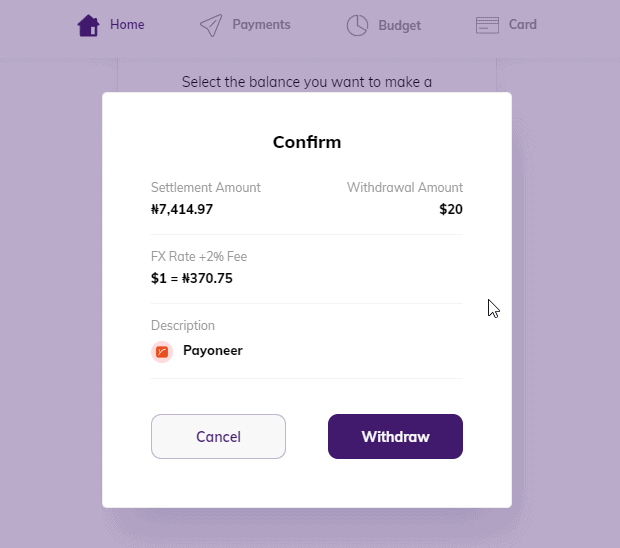
As I said, they are both free to register on. If you’re withdrawing from Payoneer with KudaBank then you will be charged at FX rate, the same rate you would be charged if you were withdrawing from Payoneer to any Nigerian (Naira) bank account. Please see the screenshot below for an example:

Payoneer Kudabank

Do I receive my money immediately?

Yes. And that’s what’s really interesting about using KudaBank to receive your Payoneer payments. You will receive your money In naira immediately you make a withdrawal. This is a big deal because Payoneer payments usually take hours, most times days to enter a Nigerian bank account.

Can I receive foreign currencies in my KudaBank account through Payoneer?

No, you can’t. Your payments will be converted to naira at Payoneer’s exchange rate and deposited in our KudaBank account.

I have more questions

Please click here to visit KudaBank’s page on this feature.

10 Places to Find Movie Subtitles for FREE

0

We wrote about 5 places to get Movie Scripts For Free 5 Years Ago.

But now, we will look at 10 places to get movie subtitles for free. Some people like to have subtitles sliding under the screen while they are watching a movie. Other movie watchers do not. Different people have different preferences.

Knowing where to go on the internet for subtitles without having to search so vigorously is priceless. We will be sharing a list of 10 places on the web that you can visit to find all your favourite movies and shows’ subtitles for free. Let’s take a look.

subdl.com

On Subdl, you can download subtitles of different movies and series. There is the “popular movies” category on the website. There are lots of pop-up ads on the website so you have to be very patient when navigating from page to page on the website. For every movie that is on the website, a well-written summary is also on the movie’s page. There are so many languages to download subtitles in. For example, The Expendables 3 has subtitles in up to 233 languages. You can choose whichever language you want your subtitles in and then click on Download.

Gomlab by Gomplayer

Gomlab is a subtitle resource centre created by the South Korean company called Gom Player. You can also upload your own subtitles on the website and thereby add to the subtitle resource. There are up to 217,264 subtitles for movies in Gomlab. There is a search bar in the home page that you can click to enter the movie title that you want a subtitle for. If they have the movie’s subtitle, it will be displayed in the search results. Click on the download link and your file will start downloading automatically. You can download the Gom Player itself to help with syncing of the subtitles to the movie speed.

Subscene

Subscene has a large list of movies and their subtitles on their website. When you land at the home page of the website, you will see a search bar at the top of the page and then if you scroll down a bit, you will also see a long list of movies and TV shows recently released in 2020. You pick the movie you want to download a subtitle for and then it takes you the movie’s page. Movies are sorted into two categories on the home page either the Latest or the Popular. Subtitle files that you download from Subscene will be in ZIP folder, so you have to extract it.

Open Subtitles

This website provides you with subtitles to movies in different languages. The Search bar at the top of the screen allows you to search for the movie you want. Subtitles are divided into 8 categories on the home page which you can browse through. You can also upload your own subtitles. The website was created in 2006.

Yify Subtitles

Yify allows you to access subtitles for your favourite movies in as many languages as possible. There are different categories of movies on the website which you can browse through. Subtitles are available in more than 40 languages. And you can browse movie subtitles based on genre.

SubtitlesDorm

Subtitlesdorm is a very large internet dormitory for English subtitles of movies. The subtitle files are in SRT formats. You can browse through subtitles for TV series, movies as well as Asian movies. The site is very modern and easy to navigate. It is also not loaded with adverts so you won’t be frustrated while browsing. It is clearly stated in the website’s About Page that only movie subtitles are posted not movie download links.

English-Subtitles

English Subtitles allows the user to switch between the mobile version and the desktop version of the website. Both TV series and movie subtitles are uploaded. You can use the search bar at the top of the page to search for your favorite movie subtitles.

Isubtitles

iSubtitle uses Apple’s technology of soft subtitles to provide subtitles for movies. The subtitles you download from this website are independent of movie resolution and are suitable for usage on Apple devices. The advantage is, you don’t have to adjust and tweak to make the subtitles fit your movie speed.

Subtitle Seeker

Subtitle Seeker is an internet portal where you can download movie and series subtitles in English language. The subtitles are available in SRT format and are totally free. You can use the Search Bar at the top of the page to browse through your favourite movie subtitles.

Addic7ed

Addic7ed is a subtitle website that you can sign up to and log in anytime you like. You can select the language you want your subtitles to be in. You can also choose the HD quality you want. Addic7ed also has a forum that you can join to discuss with other members. The Search Bar at the top of the website helps you to search for your favourite movie subtitles.
All the ten websites given above, are quality places on the web that you can download movie subtitles from. Did we miss anyone? Please leave a comment below

Productivity: 8 Chrome Extensions To Stop the Too Many Tabs Syndrome

1

Getting distracted by too many tabs can kill or weaken your productivity while working. Too Many Tabs syndrome or (TMTS) is real and it can really take a toll on your Job. Opening way too many tabs than you should can also cause your CPU to overload or slow down your computer. There are ways to prevent Too many Tabs Syndrome and we’ll be looking at one of them in this post. To be specific, we will be looking at 8 Chrome extensions that would prevent you from opening too many tabs.

10 Tabs, No More.

This Chrome extension gives you just 30 seconds to close all tabs when the number of open tabs on your browser exceeds 10 in number.
This web extension is very effective in stopping the tab syndrome. The extension is available in Chrome Web Store, Firefox, Zip File and Edge. While using your browser, and you have up to / have exceeded 10 tabs, the extension will pop up a notification by the side of your desktop informing you that you have only 30 seconds to close tabs or the extension will close some of them for you.
This web extension will help you to effectively manage your tabs. You really do not need too many tabs opened in your browser. It is not only time consuming, but also stressful to look for the particular tab you need out of the swarm. Also, too many tabs will slow down your computer system.

xTab

The xTab Chrome extension is another option for you. This chrome extension has more than 40,000 users who have tested what it feels like to be free from the swarm of tabs. This Chrome extension allows you to limit the number of tabs to any number of your choice.
You can also choose the particular tabs that will be removed once you hit the tab limit. You can customize the xTab Chrome extension for group or company purpose by contacting the developers directly at xtab.app. The default number of tabs that you can keep for the xTab chrome extension is 20. So, if you had 50 tabs opened by the time you installed the xTab, the number of tabs left will be 20. It will remove 30 tabs for you. How easy.

Too Many Tabs

This is another Chrome extension that will cure you of Too Many Tabs syndrome. This extension will only allow you to have 9 tabs open as default. You can reduce your CPU load by simply installing the Too Many Tabs extension on your desktop.

Tabalot

This Chrome extension is another solid and efficient tool that prevents you from opening too many tabs. Tabalot automatically cuts down the number of tabs that are open on your browser. Apart from pinned tabs which will not be touched, your oldest unused tab will be the first one to get closed before the extension badge count starts to flash a red colour to notify as each tab is closed.

Max Tabs

This is another Chrome extension that can help computer users keep their tab numbers at bay. This chrome extension though last updated in 2018, is still very effective in 2020 at keeping your number of tabs from driving you crazy. Too many tabs should not be a tiring thing to deal with.

‘Nuff Tabs

Just as the name of this Chrome extension implies, so does it function. The extension tells your browser and your brain that the number of tabs is enough. The extension allows you to set the maximum number of tab limit yourself, choose if your pinned tabs should be left alone, and informs you on the current number of tabs you are hoarding.

Single Tasking Tabs

Used by more than 230 users worldwide, you can definitely increase your level of daily productivity if you will just allow Single Tasking Tabs to handle all the tabs for you. The extension is meant for single tab browsing. So, once you are done browsing in a single tab, it closes the tab immediately for you.

Tab Limiter

Tab Limiter is the eighth and final chrome extension we will recommend for you in this piece. it is used by more than 20k+ users and available in English and Mandarin Chinese. This extension is very easy to navigate through and makes your tab management very easy for you. Basically, Tab Limiter is your dedicated manager of tabs and increases your productivity and concentration.
These 8 tabs were handpicked because we believe they could help stop too many tabs syndrome. Please leave us a comment below if you have any more tools or suggestions.

Marketing Dashboards: Generate 30+ Google Analytics Data in One Click

0

Generating Google Analytics data can be hectic when you need some in-depth data or so many reports in one sitting, especially if you’re not an Analytics guru. But you don’t have to worry about that because there are a couple of products that let you generate Google Analytics data in one click, for free.

You can make your marketing analytics reporting efficient and pleasant by using ask GA with an already existing 30+ marketing dashboards.

What is Ask GA

Ask GA is a marketing tool that allows you to generate Google Analytics reports in one click. You can see where you lost most of your visitors, ad campaign reports, the top referral pages, how your traffic is distributed, top-selling products and many more.

Is Ask GA Free?

Yes. Is it completely free?

How to Generate Google Analytics Data in One Click

  • Visit ask.owox.com
  • Click on Get Reports
  • Select the Google Account you’d like to generate reports from
  • Select the analytics account and that’s all.

It’s a pretty straightforward tool and it only requires you to link it to your Google Account once.

How to Make Money With Bitsika

0

Bitsika lets you send money anywhere in Africa. They also offer virtual cards and crypto. The app is available on Android and iPhone/iPad. We already talked about Bitsika on this blog. Please click here to learn more about the platform.

New Update From Bitsika

“1. You can now earn good cash for referring/inviting your friends and family to use Bitsika.

2. Go to the “Referral” page and you will see a question “Who referred you?”. Tell your friends and family to input your username here. Invite as many people as you want.

3. You get rewarded when the people who you referred verify their identity.

4. We give out $0.15 (0.86 GHS / 60 NGN) for each successful referral.

5. Please also update the app to enjoy a better experience.

It is important that everyone download the new version of the app as some components in the old version might stop working as we move forward. Please update the app now.”

How to Make Money With RiseVest

0

From RiseVest:

“We’re excited every time someone joins RiseVest through a friend because it’s proof that referrals from people like you are the most powerful marketing we could never pay for.

But what if we paid you for it?

We want to, so we’ve launched the RiseVest Affiliate Program to help you get paid for referring people to RiseVest.

How does it work?

Whenever you refer someone to RiseVest and they invest some money, we’ll pay you a 3% commission on every funding the user you referred adds to investment plans in their first year of using RiseVest.

What do you need to be an Affiliate?

Have at least $50 invested on RiseVest.
Know about all our investment plans.
Have a Bank Verification Number (BVN).

Interested? Apply on our Affiliate website and we’ll get back to you within 48 hours.

Love,
Your friends at Rise.”

Check out my YouTube videos

X